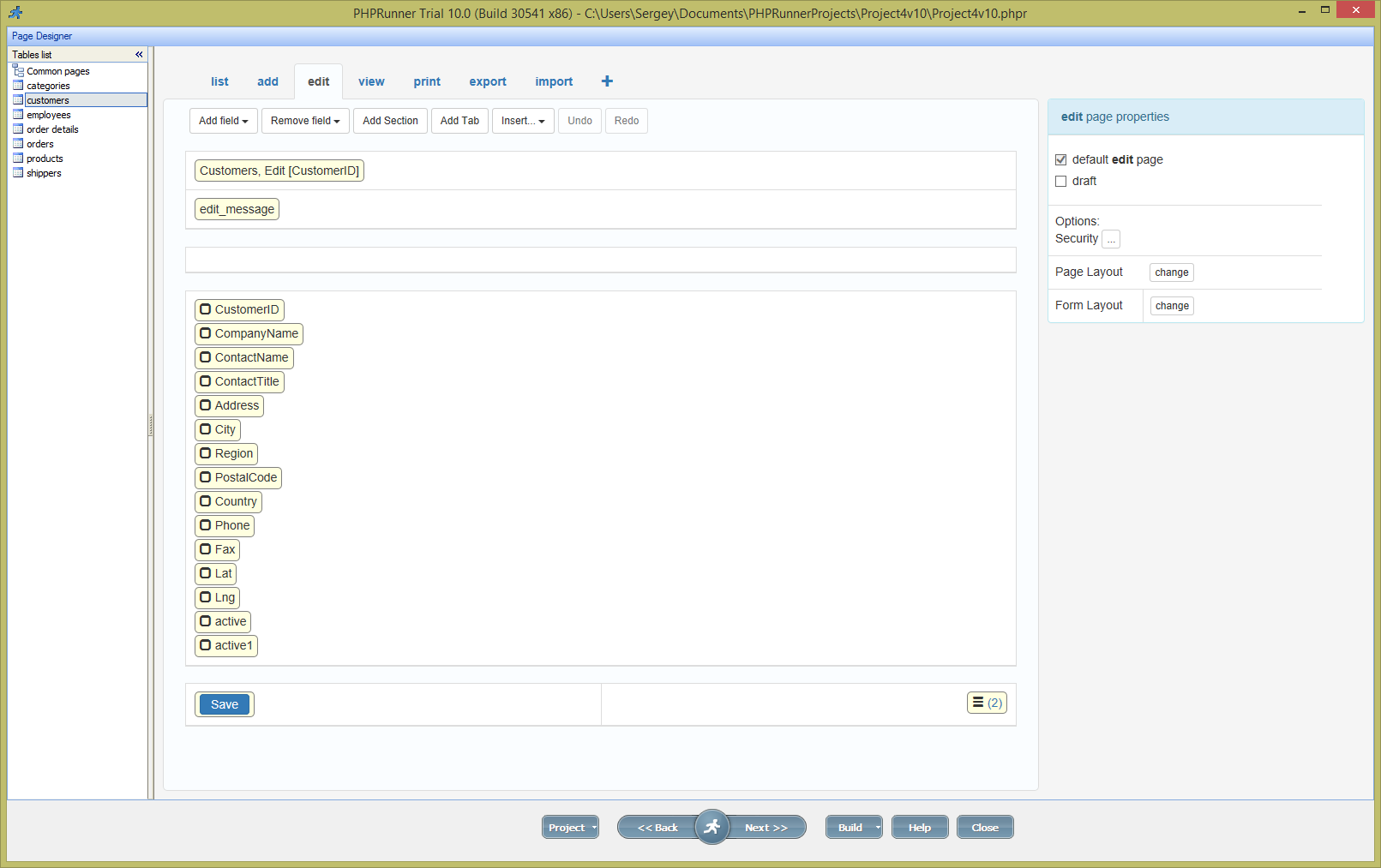
Version 10 makes creating multi-column forms easier. In previous versions you needed to select layout on Style Editor page. In version 10 you can do this right in Page Designer and you can change it at any time without resetting the page. Changes you made to your page will no be lost.

In this article we use Customers table from Northwind database. In Page Designer select Edit page. Here is how it looks by default (all images are clickable):

Continue Reading "Using multi-column design in version 10"

It is about time we talk about version 10 of PHPRunner, ASPRunner.NET and ASPRunnerPro. We expect beta version to be available in November and stable version will be released before the end of the year.

Make sure that your software maintenance is current. Otherwise you will have to purchase version 10 at the full price.

The most interesting new feature in this update is Page Designer which will complement and eventually will replace the Visual Editor. This is quite a big change and before we talk about new functionality I need to explain why this change was required.

Continue Reading "Version 10. Page designer"

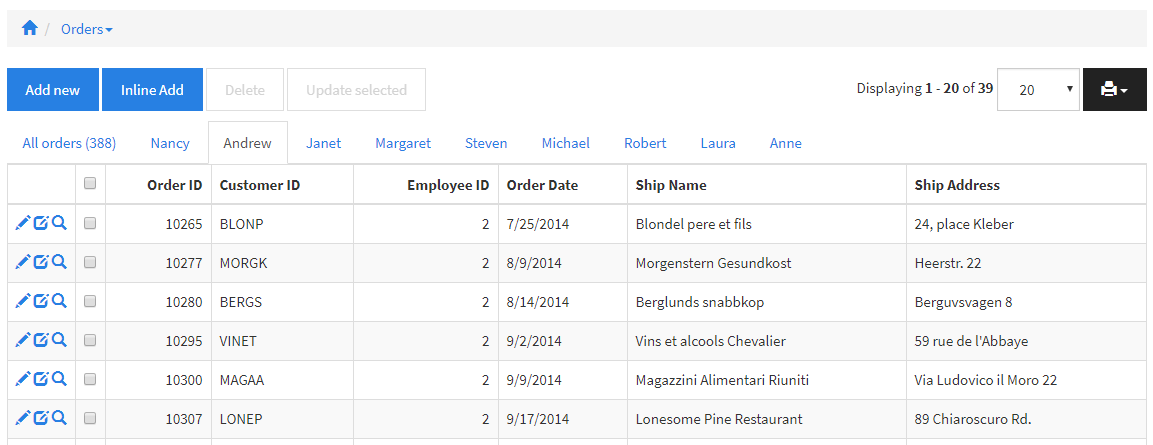
PHPRunner 9.8, ASPRunnerPro 9.8 and ASPRunner.NET 9.8 is here! If you purchased or upgraded PHPRunner, ASPRunnerPro or ASPRunner.NET less than one year ago logon to control panel at https://xlinesoft.com/dss/support.asp and find download links and registration keys under ‘My purchases’. There should be ‘Reg info’ link next to your latest upgrade purchase. New customer purchase links: PHPRunner ASPRunnerPro ASPRunner.NET Upgrade links: PHPRunner ASPRunnerPro ASPRunner.NET Trial version download links: http://xlinesoft.com/download Here is the list of new features in version 9.8. 1. Tabs and additional WHERE on List…Continue Reading “PHPRunner 9.8, ASPRunnerPro 9.8 and ASPRunner.NET 9.8 is here!”

PHPRunner 9.7, ASPRunnerPro 9.7 and ASPRunner.NET 9.7 released!

New customer purchase links:
PHPRunner
ASPRunnerPro
ASPRunner.NET

Upgrade links:
PHPRunner
ASPRunnerPro
ASPRunner.NET

Trial version download links:
http://xlinesoft.com/download

Here is the list of new features in version 9.7.

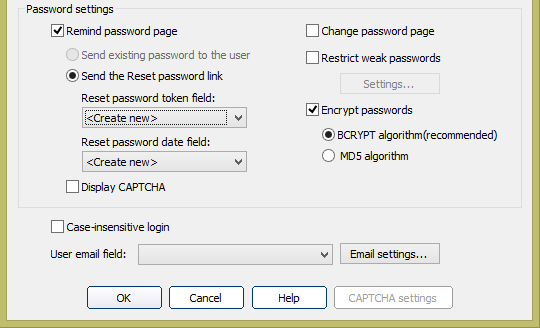
1. Improved password hashing

Option to use industry standard bcrypt hashing algorithm. Send password reset link to user’s email, link expires in 24 hours.

Continue Reading "Version 9.7 of PHPRunner, ASPRunnerPro and ASPRunner.NET"

PHPRunner 9.6, ASPRunnerPro 9.6, ASPRunner.NET 9.6 released (November 10th, 2016).

If you purchased or upgraded PHPRunner, ASPRunner.NET or ASPRunnerPro after November 10, 2015 this update is free of charge for you. Logon to control panel at https://xlinesoft.com/dss/support.asp and find download links and registration keys under ‘My purchases’. If you do not have a help desk account yet create a new one using the same email address you have used to place the order.

Trial version download links

‘Buy now’ pages

PHPRunner

ASPRunner.NET

ASPRunnerPro

Upgrade pages

PHPRunner

ASPRunner.NET

ASPRunnerPro

Important: if you purchased PHPRunner, ASPRunnerPro or ASPRunner.NET before November 10th 2015 you have till November 20th, 2016 to use discounted upgrade option. After November 20th, 2016 you will have to purchase software at the full price. Do not miss your chance to upgrade for less.

‘Update selected’ feature

This is a long awaited feature that allows you quickly makes changes to multiple records. You can choose fields to appear on ‘Update selected’ dialog. Depending on Edit page settings ‘Update selected’ page can be shown either in popup or as a separate page.
Continue Reading "PHPRunner 9.6, ASPRunner.NET 9.6, ASPRunnerPro 9.6 released"

Runner.displayPopup() provides a convenient way to display an application page or custom HTML in a popup window. The examples below cover the core options and common ways to use the function in PHPRunner and ASPRunner.NET.

You can use this JavaScript function in places such as the JavaScript OnLoad event or the ClientBefore event of a custom button.

The simplest example requires only the URL of the page to display. Here is how to open the Add page of the Products table:

Continue Reading "Displaying Popup Windows in PHPRunner and ASPRunner.NET applications"

PHPRunner and ASPRunner.NET provide visual options for creating and configuring charts. When you need more control over a chart’s appearance or behavior, you can customize the underlying AnyChart object with the ChartModify event.

ChartModify gives you direct access to the chart object before the chart is displayed. This makes it possible to customize titles, labels, colors, scrolling, zoom, axes, value formatting and many other chart properties.

Continue Reading "Customize Charts in PHPRunner"

Web applications generated by PHPRunner, ASPRunner.NET or ASPRunnerPro communicate with databases via means of SQL queries. Whenever you search, edit or delete data your web application issues a series of SQL queries, gets results back and displays it on the web page. Understanding the basics of SQL will help you build better apps and find errors faster.

Our code generators come will handy option to display all SQL queries application executes. For this purpose you can add the following line of code to AfterApplicationInitialized event:

In PHPRunner

$dDebug = true;
Continue Reading "Troubleshooting SQL queries"