Win cash prizes creating new application themes The contestants are asked to submit themes created in PHPRunner/ASPRunner Style Editor. Contest rules To participate in the contents simply create a unique theme using ASPRunner or PHPRunner. The contest will start on September 15th, 2011 and run until September 23th, 2011. Our judging panel will determine the best themes. The winners will be announced on the website and via email newsletter on September 26th, 2011. We are looking for creativity and originality as well as themes that…Continue Reading “Theme Design Contest”
Special offer: Mobile template, Quiz template and ReportsMaestro bundle
Time Remaining

Normally $149
$50
100% money back guarantee! For any reason. Anytime.
Quiz template includes both PHP (MySQL) and ASP (MS Access) versions.
ReportsMaestro is a Web-based report and chart builder that supports all major databases.
Mobile template allows you to build mobile version of your web application (requires PHPRunner 6 or ASPRunnerPro 7).
For all those who are patiently waiting for a new version to be released – we will have PHPRunner 6/ASPRunnerPro 7 beta available July 12th-15th. We apologize for prolonged wait.
As you remember this new version features Style Editor, Mobile Template and easily customizable layouts. I’d love to present a few examples of interfaces customized in Style Editor (all images are clickable).
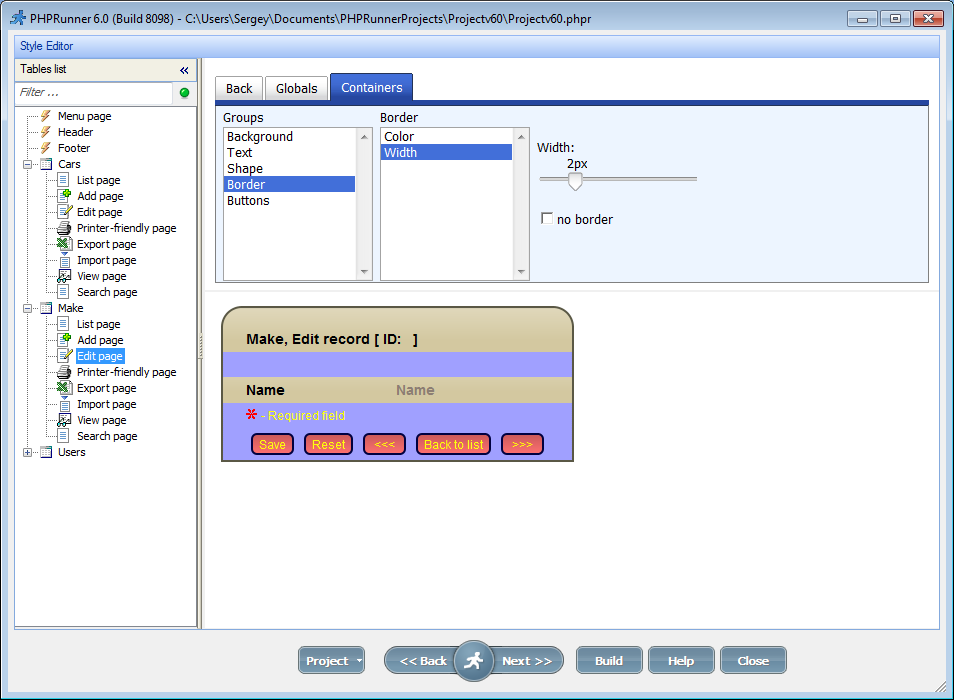
Edit page in style editor
Note buttons and panels shape, gradient backgrounds and different border types.
Many developers have the need to work collaboratively on the same ASPRunnerPro or PHPRunner project. In this tutorial I’ll show how to make this happen with almost no effort. We are going to utilize the power of version control system (VCS). Version or revision control systems track and provide control over the changes to the source code. The most popular VCS systems nowadays are Subversion, Git, Mercurial and Bazaar. We plan to use Subversion (SVN) which is easy to get started with. I’ll cover the…Continue Reading “Best practices: multiple developers working on the same project”
We are on the verge of releasing a next version of PHPRunner/ASPRunnerPro that style editor and revamped templates. We will be completely separating the HTML from CSS (separating layout from appearance) which will simplify to a great extent the development of new and adaption of existing templates. In the new version all users, from novice to advanced developers, will be able to build and finally share their own templates. We are planning on launching a templates marketplace (codename RunnerExchange) similar to Apple AppStore where you…Continue Reading “A few thoughts on Templates Marketplace”
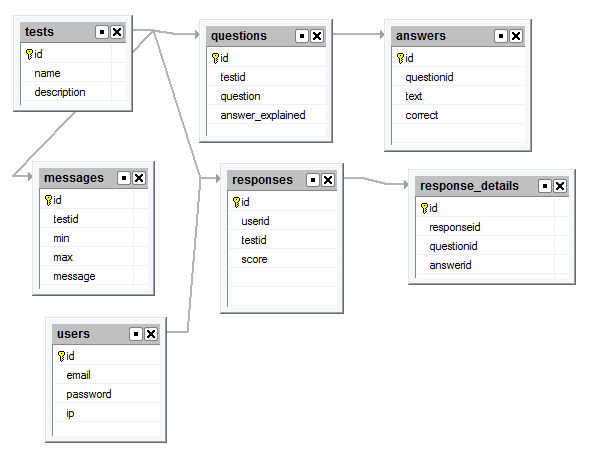
This article explains how the Quiz Template works in great details. It can help you better understand the inner workings of this template and provide the guidance you need in designing your own.
Purchase Quiz template for $25.
Lets start with database design. In this tutorial we use MySQL database.
In this article we will cover all the aspects of creating multilingual websites with the help of PHPRunner. This process includes the following steps: Translation of system messages Translation of table/field names and custom labels Translation of data from the database Translation of system messages First of all, you need to define the language(s) of standard texts in the website interface or “system messages”. On the Miscellaneous page you can choose one or more languages which your website will support. Use the Language drop-down box…Continue Reading “Localizing PHPRunner/ASPRunnerPro applications”
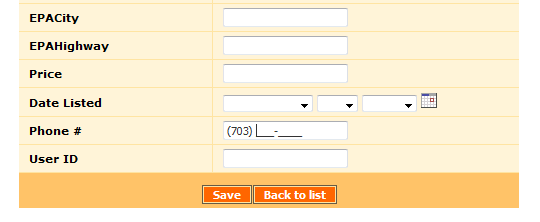
In this tutorial we are going to use an excellent jQuery Masked Input plugin by Josh Bush.
PHPRunner gives you several ways to add custom logic to a generated application. The most common are events, custom buttons, View as: Custom and code snippets. They can sometimes solve the same problem, but each one is best suited to a different kind of task. The easiest way to choose is to ask three questions: What should trigger the code? Does the code run on the server, in the browser, or both? Is the change tied to a specific page action, or is it simply…Continue Reading “PHPRunner Events, Buttons and Code Snippets: When to Use Each”
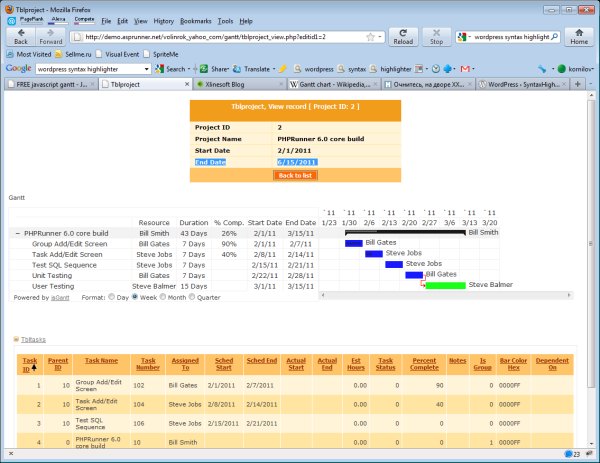
A special thank you to Fred Blau who provided the original jsgantt integration sample.
A Gantt chart is a type of bar chart that illustrates a project schedule. Gantt charts illustrate the start and finish dates of the tasks that belong to this project. Some Gantt charts also show the dependency relationships between activities (tasks). Gantt charts can be used to show current schedule status using percent-complete shadings and a vertical “TODAY” line.