Data validation helps prevent incomplete, incorrectly formatted or otherwise invalid data from being saved. PHPRunner provides several ways to validate user input, from built-in field rules to custom JavaScript and server-side validation.

The right approach depends on what you need to check. Simple requirements such as mandatory fields can usually be handled with built-in validation. More complex business rules may require custom code.

A useful rule is to distinguish between user experience and data integrity. Client-side validation gives users immediate feedback, but important rules should also be enforced on the server before data is saved.

Continue Reading "Data Validation in PHPRunner: Client-Side and Server-Side Options" →

Custom Edit controls let you replace a standard field input with a specialized control while keeping it integrated with PHPRunner Add and Edit pages.

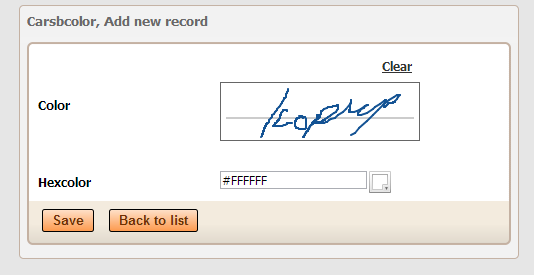
This article explains the underlying plugin structure using ColorPicker and SignaturePad as practical examples. It covers the PHP and JavaScript parts of a control, adding CSS and other assets, passing settings, validation and installing the finished plugin in PHPRunner.

Looking for a faster way to create a new control? You can also use the PHPRunner custom Edit controls skill with ChatGPT to generate the PHP, JavaScript, CSS and supporting files for a new control. See Building a World Cup Prediction Challenge in PHPRunner, especially the section about creating custom Edit controls with ChatGPT.

Continue Reading "Create a Custom Edit Control Plugin in PHPRunner" →

In this article we will be focusing on debugging and troubleshooting the JavaScript errors. We will look at few examples to illustrate the methods used. For this purpose we will be using developers tools that come with Chrome browser. If you use Firefox – download and install the Firebug. Firebug is an extension to Mozilla Firefox web browser which allows us to monitor and debug the JavaScript in any web page. var ctrlPrice = Runner.getControl(pageid, ‘Price’); var ctrlQuantity = Runner.getControl(pageid, ‘Quantity’); var ctrlTotals = Runner.getControl(pageid,…Continue Reading “How to troubleshoot Javascript errors” →

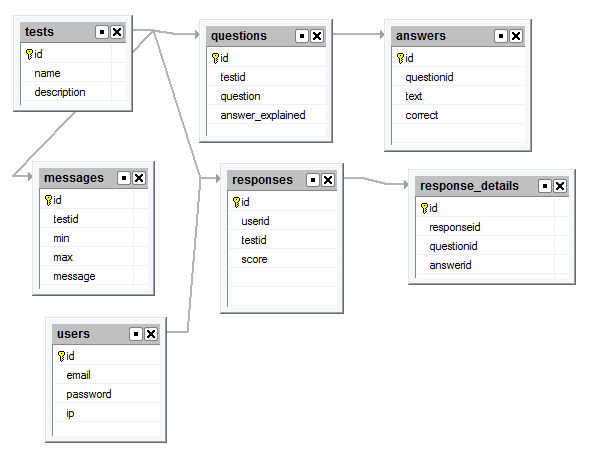
This article explains the inner workings of Survey template.

Before we start I encourage you to check Survey template live demo. Register, then login and add a new Survey. Add questions, answers and answer options where necessary. Once done with setup activate the survey. Now you can take survey, view responses etc.

Purchase Survey template for $50

Application setup

Once you create a project using Survey template you can simply build your project and start using it. Security model is simple. There is one user by default (admin/admin) with full access to all data. There is also Guest account enabled with access to Response view Add page so guest users are able to take surveys without logging in.

There is also Registration page enabled. Users can register and create their own surveys. This option is mostly for demo purposes and you may want to turn it off.

Managing surveys

Once you are logged in create a new survey and add questions. Questions are grouped into groups. If you don’t need grouping simply add all question to default group (Group 1).

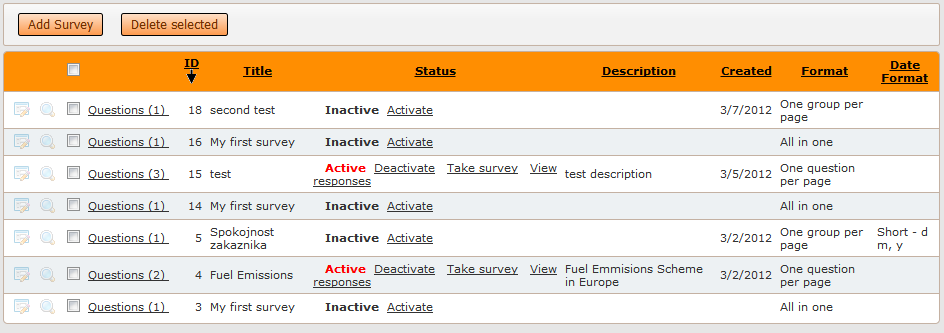
List of surveys is your start screen. You can add or delete surveys here, make them active or inactive, take surveys and view responses.
Continue Reading "Survey template" →
Many developers have the need to work collaboratively on the same ASPRunnerPro or PHPRunner project. In this tutorial I’ll show how to make this happen with almost no effort. We are going to utilize the power of version control system (VCS). Version or revision control systems track and provide control over the changes to the source code. The most popular VCS systems nowadays are Subversion, Git, Mercurial and Bazaar. We plan to use Subversion (SVN) which is easy to get started with. I’ll cover the…Continue Reading “Best practices: multiple developers working on the same project” →

In this article we will cover all the aspects of creating multilingual websites with the help of PHPRunner. This process includes the following steps: Translation of system messages Translation of table/field names and custom labels Translation of data from the database Translation of system messages First of all, you need to define the language(s) of standard texts in the website interface or “system messages”. On the Miscellaneous page you can choose one or more languages which your website will support. Use the Language drop-down box…Continue Reading “Localizing PHPRunner/ASPRunnerPro applications” →