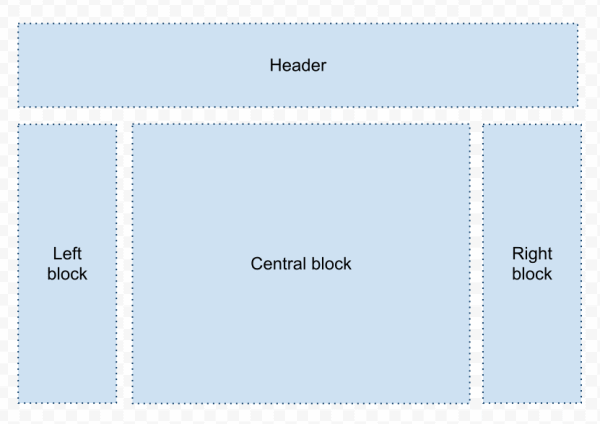
We are on the verge of releasing a next version of PHPRunner/ASPRunnerPro that style editor and revamped templates. We will be completely separating the HTML from CSS (separating layout from appearance) which will simplify to a great extent the development of new and adaption of existing templates. In the new version all users, from novice to advanced developers, will be able to build and finally share their own templates. We are planning on launching a templates marketplace (codename RunnerExchange) similar to Apple AppStore where you…Continue Reading “A few thoughts on Templates Marketplace”
This article explains how the Quiz Template works in great details. It can help you better understand the inner workings of this template and provide the guidance you need in designing your own.
Purchase Quiz template for $25.
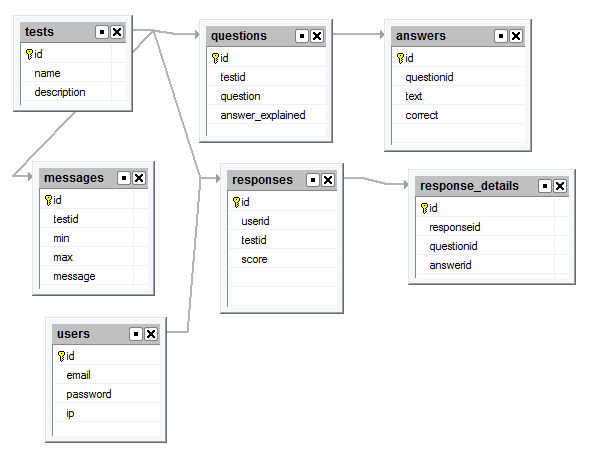
Lets start with database design. In this tutorial we use MySQL database.
In this article we will cover all the aspects of creating multilingual websites with the help of PHPRunner. This process includes the following steps: Translation of system messages Translation of table/field names and custom labels Translation of data from the database Translation of system messages First of all, you need to define the language(s) of standard texts in the website interface or “system messages”. On the Miscellaneous page you can choose one or more languages which your website will support. Use the Language drop-down box…Continue Reading “Localizing PHPRunner/ASPRunnerPro applications”
PHPRunner gives you several ways to add custom logic to a generated application. The most common are events, custom buttons, View as: Custom and code snippets. They can sometimes solve the same problem, but each one is best suited to a different kind of task. The easiest way to choose is to ask three questions: What should trigger the code? Does the code run on the server, in the browser, or both? Is the change tied to a specific page action, or is it simply…Continue Reading “PHPRunner Events, Buttons and Code Snippets: When to Use Each”
A special thank you to Fred Blau who provided the original jsgantt integration sample.
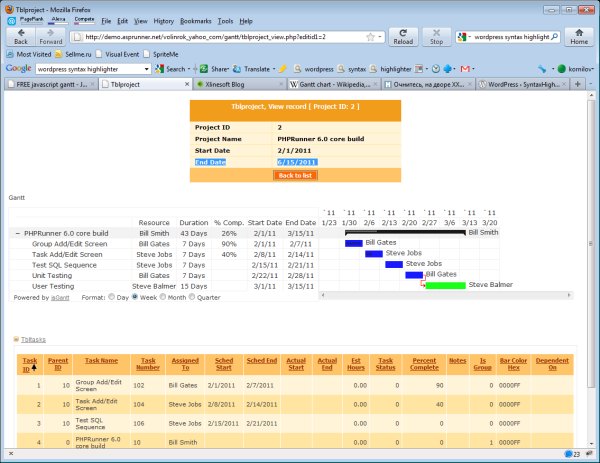
A Gantt chart is a type of bar chart that illustrates a project schedule. Gantt charts illustrate the start and finish dates of the tasks that belong to this project. Some Gantt charts also show the dependency relationships between activities (tasks). Gantt charts can be used to show current schedule status using percent-complete shadings and a vertical “TODAY” line.
When a PHPRunner application feels slow, the first step is to identify where the time is actually being spent. A slow List page can be caused by the database query, custom server-side code, the amount of data rendered on the page, large lookup controls, network latency or the web server itself.
The most effective approach is to isolate the bottleneck first and optimize only the part that is actually slow.
Continue Reading "Improving PHPRunner Application Performance"In this tutorial we are going to use Facebook Javascript SDK. Here is how you can add Facebook Connect functionality to your PHPRunner application. 1. Register your website to get an app id. http://developers.facebook.com/setup/ Later you can see your application settings at http://www.facebook.com/developers/apps.php 2. Add ‘Login with Facebook’ button to your application The natural place to add this button is a login page. Open login page in Visual Editor. Make sure ‘Show borders’ option is turned on. Insert a new table row below ‘Remember password’….Continue Reading “Adding Facebook Connect functionality to your application”
One-to-Many relationships are very straightforward, can be setup with a few clicks and are described in the ‘Master-Details Relationships’ tutorial. However, many-to-many relationships are not as intuitive and will be a subject of this post. Let’s look at an example where we have multiple offices and employees. One employee can work at multiple offices and an office can have more than one employee. To handle this many-to-many relationship the first step would be to break it into two one-to-many relationships creating a new link table,…Continue Reading “How to setup many-to-many relationships”
This tutorial shows how to use conditional formatting in PHPRunner/ASPRunnerPro projects.
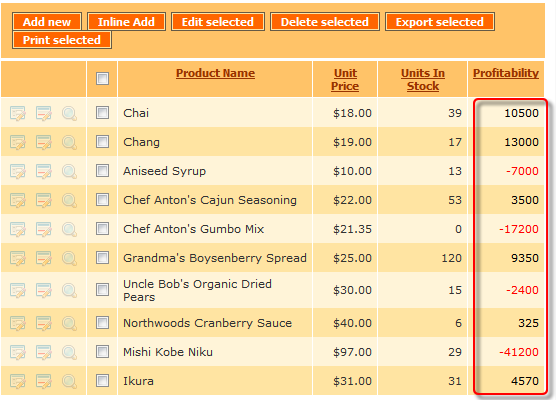
Our first example illustrates the profitability of the product line where we have a list of products with their respective monthly profit figures. All positive numbers are displayed in black and all negative in red. Changing the font color of this field based on its value helps the viewer immediately spot the losing products and take necessary actions.
We are taking yet another step toward creating the best-in-class code generator. Here is what you can expect to see in the next release of PHPRunner6.0/ASPRunner7.0.
New layouts
Let me start by introducing the layout elements.
Blocks
Blocks are high-level page elements. A typical List page consists of four blocks. Some blocks can be empty.