PHPRunner and ASPRunner.NET already provide password policies, encrypted password storage, CAPTCHA, two-factor authentication, and user permissions. In this tutorial, we will add two more checks: reject passwords found in known data breaches and block visitors whose IP addresses have a very high abuse score.
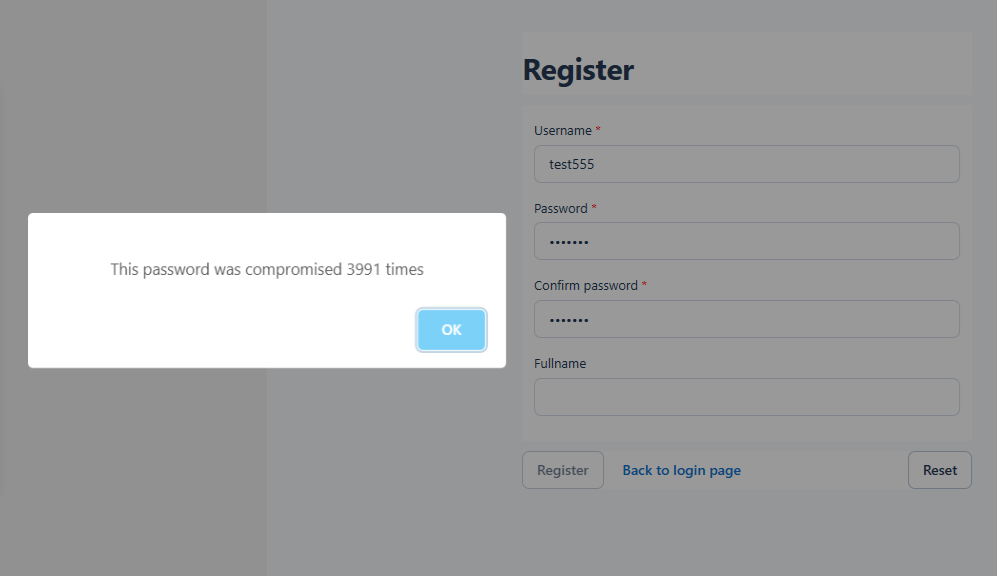
During registration, haveibeenpwned.com checks whether the password has appeared in known data breaches. The password itself is never sent to the service, and this API does not require a key.
Before processing an application page, abuseipdb.com checks whether the visitor’s IP address has been associated with abusive activity. This service requires an API key. Section 6 explains how to create that key. The results are cached locally to reduce the number of external requests.
1. Creating the IP reputation cache table
The example project uses MySQL. Create the following table in the application’s database, then add it to the project on the Datasource tables screen.
2. Adding the reusable security-check functions
The first function creates a SHA-1 hash of the password and sends only its first five characters to Pwned Passwords. The remaining hash characters never leave the application.
The second function checks the local cache before contacting AbuseIPDB.
PHPRunner
Open Style Editor → Custom Files, create security_checks.php, and add this code:
Open Events → Global events → After App Init and load the file:
ASPRunner.NET
Open Style Editor → Custom Files, create security_checks.cs, and add this code. ASPRunner.NET compiles C# custom files with the generated application, so no separate include statement is required.
3. Checking the password from a field event
Open the Register page in Page Designer. Select the password field, open its field events, and add an event that runs when the user leaves the field.
Use the following JavaScript in Client Before:
In the Server part, add the code for your product.
PHP
C#
Use this JavaScript in Client After:
4. Disabling the Register button when the page loads
Open Events → Global events → Register page → JavaScript OnLoad and disable the ‘Register’ button until the password check succeeds:
register_save is the Item ID of the standard Register button.
5. Enforcing the password check before registration
The field event improves the user experience, but client-side controls can be bypassed. Repeat the check in Events → Global events → Register page → Before registration.
PHP
C#
Replace password if your login table uses a different password field name. Field names are case-sensitive.
6. Checking IP reputation in After App Init
Create a free account at abuseipdb.com/register. After signing in, open the account dashboard, select ‘API Settings’, and generate an API v2 key.
Add the following code after the existing code in Events → Global events → After App Init. Replace the placeholder with your API key and keep the real key out of public project exports and source repositories.
PHP
C#
The checkIPReputation() function reuses a cached result for 24 hours. The sample uses the MySQL DATE_SUB() and NOW() functions. Adjust that date expression if your project uses another database.
An AbuseIPDB failure does not block the application. A score of 90 or higher does. Adjust the threshold to match your own security requirements.
If the application runs behind Cloudflare, a load balancer, or another reverse proxy, configure the web server to restore the visitor’s original IP address before this code runs. If the application is accessed directly, no additional configuration is required. Do not read X-Forwarded-For or another forwarding header unless requests to the application can come only through a trusted proxy, because these headers can otherwise be forged.
After rebuilding the project, test registration with a known compromised test password and then with a unique password. Confirm that the server-side registration event still rejects a compromised password if JavaScript is disabled. For the IP check, confirm that the first lookup creates a cache row and subsequent page requests reuse it for 24 hours.
The Pwned Passwords implementation follows the service’s k-anonymity range-search model and uses response padding. See the Pwned Passwords API documentation. See the AbuseIPDB Check endpoint documentation for API-key and response details.
