The World Cup 2026 Crystal Ball Challenge is over! Thank you to everyone who took part and made the challenge fun and engaging. Congratulations to all participants, and especially to the winners for their outstanding predictions!
In this tutorial we will cover all non-trivial techniques that made this project possible. As you can imagine, the main challenge making this project look sleek and easy to use and I believe we achieved this goal.
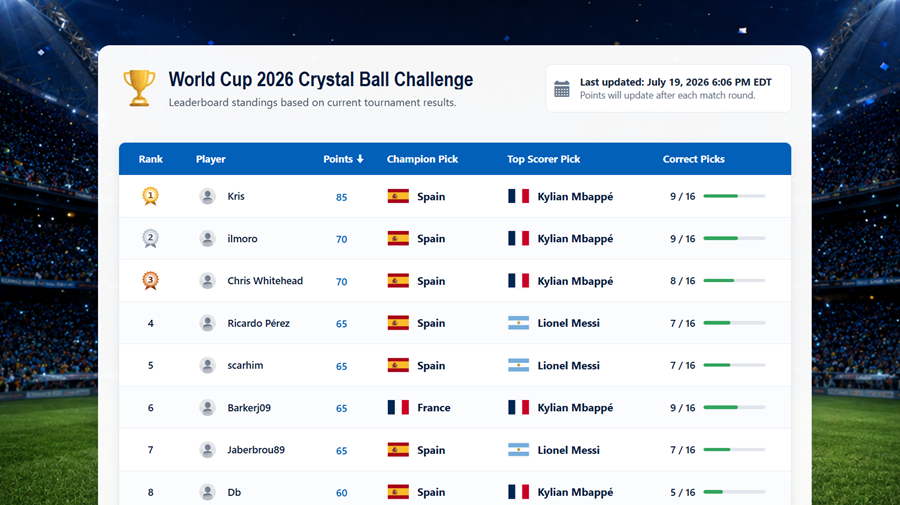
See the final leaderboard online
We will talk about:
1. Creating image-based edit controls
2. Grouping team pickers and preventing duplicate selections
3. Enforcing one prediction per user with PHPRunner events
4. Disabling Add and Edit after the submission deadline
5. Enabling Save only after all required answers are selected
6. Calculating scores and rankings with custom SQL
7. Adding rank graphics, progress bars, and current-user highlighting
8. Integrating custom landing, scoring, and thank-you pages
9. A few more visual tweaks
10. How to create your own custom Edit controls easily
Download project for PHPRunner
1. Creating image-based edit controls with table and SQL lookups
I think this is the most important part. We introduced three image-based custom edit controls that you can use in other applications as well. All three are available for download on our marketplace. Right now it is for PHPRunner only but we will provide ASPRunner.NET equivalents very soon. We will also teach you how to create new custom Edit controls using ChatGPT.
ImagePicker
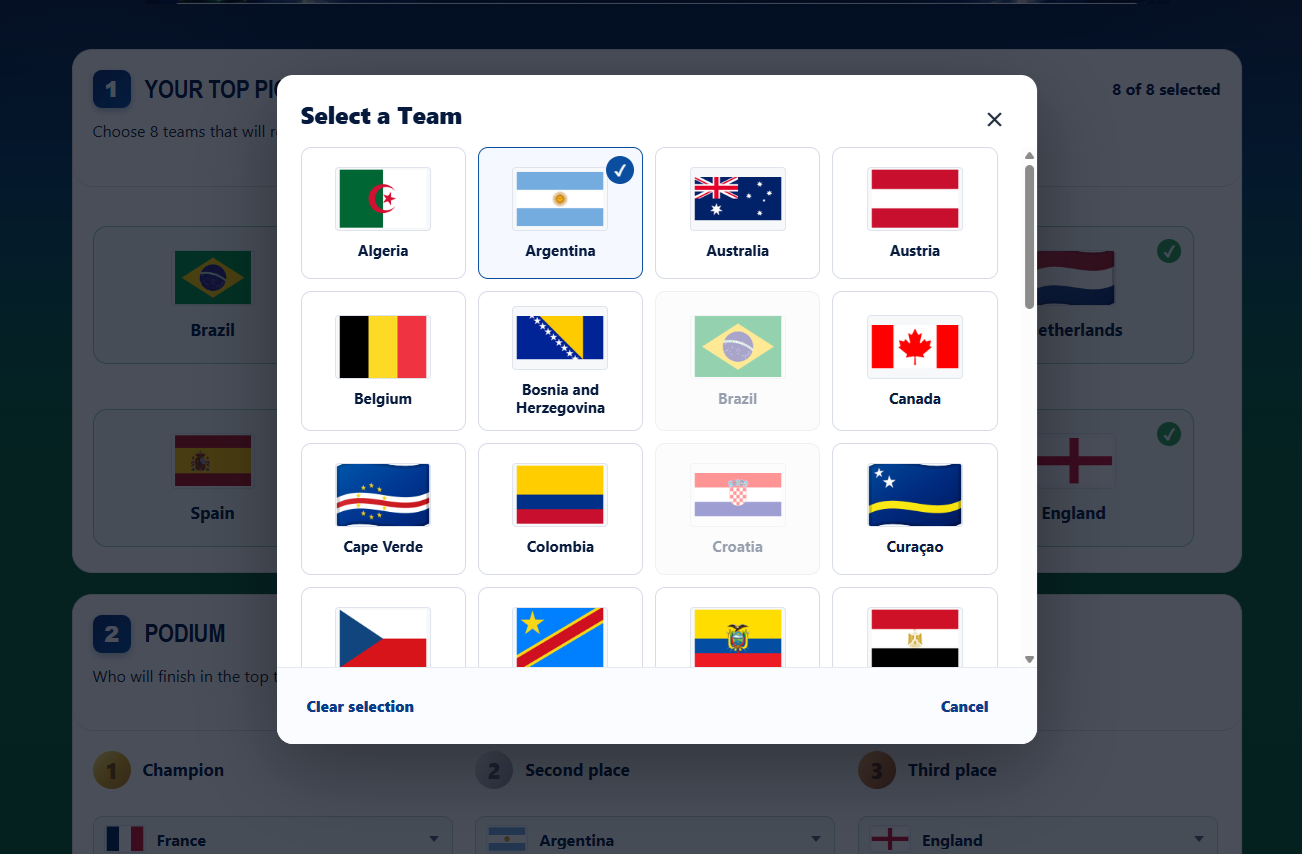
This control allows a selection of a single country. We display all countries and their flags in a scrollable popup and allow to select one. Once country is selected the popup is closed.
ImageDropdown
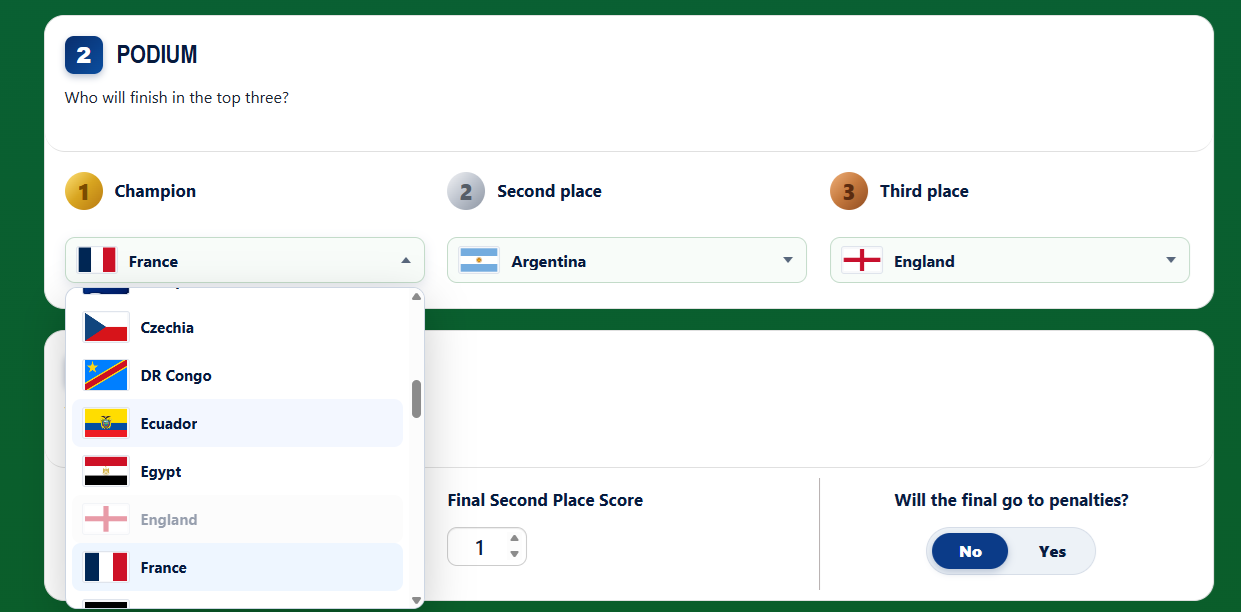
This is an advanced version of a regular dropdown box. We have used it to select podium teams and top scorer players. Displaying country flag next to player name definitely makes it easier to choose the player you want.
ImageChoice
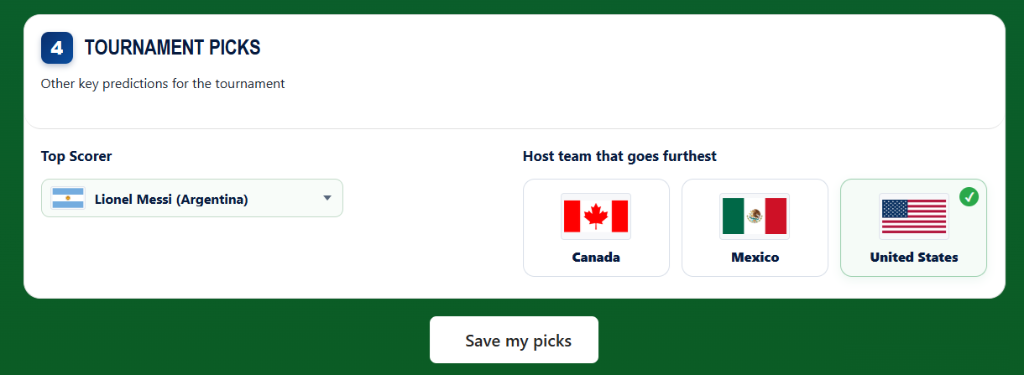
This is something that resembles a regular radio-button control, it just looks nicer. We have used to allow a selection of the host team that advances further.
2. Grouping team pickers and preventing duplicate selections
The Top 8 prediction is stored in eight fields: top8_team1_id through top8_team8_id. Without additional logic, eight independent lookup controls would allow the same country to be selected several times. The project solves this inside the custom edit control by assigning all eight controls to one group.
Each Top 8 field uses the following group settings:
The group name tells the controls that they belong to the same logical question. When a country is selected in one field, duplicate prevention makes it unavailable to the other seven. The shared status element (“status_element_id”) can report progress across the whole group rather than treating each field as an unrelated input. You can see status field saying something like “7 of 8 selected” at the top right corner of the first section.
The podium fields use the same idea with a different group:
Champion, second place, and third place remain separate database columns, but they behave as one coordinated set of choices. This is useful in many PHPRunner projects: room assignments, ranked preferences, product bundles, team selection, or any form where several fields use the same type of lookup wizard but must not repeat the same value.
3. Enforcing one prediction per user with PHPRunner events
Every participant should have one prediction record. Hiding the Add button after submission is not sufficient because the user could revisit the Add URL directly. The project checks for an existing record in the prediction table’s Before Process Add event.
Security::getUserName() returns the logged-in email because email is configured as the PHPRunner username field. The query translates that login identity into a prediction record ID. If the record exists, the user is redirected to Edit instead of being allowed to create another row.
The project also performs the same lookup in the Menu event. A normal user who reaches the menu is sent to Edit when a prediction exists or Add when it does not. The Menu event improves navigation; the Before Process Add event enforces the rule at the page boundary.
4. Disabling Add and Edit after the submission deadline
Prediction forms must close at a known time. Instead of only hiding buttons, the project changes the table permission string in the Table permissions event. This affects PHPRunner’s permission checks for every request. The following code was added to wc_predictions table GetTablePermissions event.
PHPRunner represents table operations with letters in the permission string. Removing A and E disables Add and Edit while leaving allowed read operations intact. This is stronger than CSS or JavaScript because it is evaluated on the server.
The project also detects direct requests for wc_predictions_add.php or wc_predictions_edit.php and redirects them to a read-only page. That redirect is useful feedback, but the permission change is the actual security control.
The example has a hard-coded date. A reusable implementation should read the deadline and timezone from an application settings table. It should also locate the current user’s prediction ID before redirecting to View so the destination contains a valid editid1 key.
5. Enabling ‘Save’ button only after all required answers are selected
PHPRunner’s normal validation works field by field. This form also needs a page-level rule: the participant should not submit until every required prediction category is complete. The Add and Edit JavaScript OnLoad events monitor the required controls and toggle the Save item.
The important detail is that the page contains both standard PHPRunner inputs and custom image controls. Listening only to ordinary change events is not enough, so the project also listens for interaction with the custom-control elements:
The short delay lets the custom editor update its PHPRunner control value before the page checks it. The Edit page uses the same code with the edit_save item ID. The script also adds min=”0″ and max=”10″ to the final-score inputs.
This improves the user experience, but it is not a replacement for server-side validation. Required values and numeric ranges should still be checked in Before Add and Before Edit before the record is written.
6. Calculating scores and rankings with custom SQL
The Leaderboard is implemented as a custom view. We wanted to perform the whole score calculation in SQL query so it looks quite tricky.
Top 8 selections are unordered. Each predicted team is tested against all eight actual Top 8 fields:
NULLIF(…, 0) prevents an unanswered actual-result field stored as zero from being treated as a legitimate team. The pattern is repeated for all eight predicted positions and then multiplied by five for the point score.
The exact-position categories use direct comparisons with their own weights:
The remaining categories add points for top scorer, both final-score values, penalties, and the host nation progressing furthest. The result is exposed as normal Leaderboard fields, allowing PHPRunner to build a List page over calculated data.
The exported query orders by points DESC. If the published rules promise additional tie breakers—correct picks and then submission time—the ORDER BY should explicitly include them:
7. Adding rank graphics, progress bars, and current-user highlighting
The SQL produces leaderboard data, but the List page turns it into a competition display. Before processing the List page, an event resets the rank counter and removes any previous current-user standing from the session:
Before each row is displayed, the project compares the row’s player with the current user’s display name. When they match, it stores the rank and points for the standing panel and highlights the row:
Custom field formats replace raw values with visual components. Positions 1, 2, and 3 use gold, silver, and bronze images. The correct_picks value becomes both text and a progress bar:
Two Page Designer snippets complete the page. The header displays the latest actual-answer update time, and the standing snippet reads the session values to show “Your current standing: #N with N points.” This is a useful example of coordinating List events, custom field formats, session state, snippets, images, and CSS on one generated page.
For a larger application, compare users by an immutable user ID rather than display_name. Display names can change and may not be unique.
8. Integrating custom landing, scoring, and thank-you pages
Not every page in a PHPRunner application must be generated from a database table. This project carries standalone files in the export’s files/ directory. PHPRunner copies them into the output folder when the application is built.

index.php is the public homepage/landing page. It explains the challenge, dates, prizes, and entry process, then links visitors to PHPRunner’s register.php and login.php. scoring.php explains the rules implemented by the Leaderboard SQL. thankyou.php provides a deliberate completion screen after the participant saves the initial prediction.
The connection back to PHPRunner happens through events and ordinary URLs. For example, the prediction After Add event sends the browser to the standalone confirmation page:
Registration uses the opposite direction: a generated PHPRunner page sends the new account into the prediction workflow after assigning its role and logging it in:
The exported files also include include/wc_functions.php, which is loaded by the global initialization event. It provides shared rendering functions used by prediction View and leaderboard formats, allowing generated pages to display the same flags and labels as the custom controls.
This approach keeps authentication, permissions, and data entry inside PHPRunner while allowing marketing, rules, and confirmation pages to have purpose-built layouts. The important maintenance rule is to keep URLs, asset paths, and shared includes consistent between the standalone files and generated output.
9. A few more visual tweaks
Yes/No switch on Add/Edit pages
We decided that using a new Edit control for such a simple task would be an overkill. Instead, we used a simple radio-button control for ‘Final goes to penalty?’ field and a bit of CSS and Javascript OnLoad event of Add/Edit pages. Javascript basically assigns CSS class to radio-button control and the styling itself is done in CSS.
Check classes that start with .wc-penalty-toggle in Custom CSS.
One more tweak, the display of correct_picks field on leaderboard page. It is implemented as ‘View as’ Custom and use some additional CSS classes. Here is the code:
In this code 16 is the total number of picks and this is how we calculate the percentage of correct picks.
10. How to create your own custom Edit controls easily
- Download this skill pack
- Start a new ChatGPT conversation
- Upload the ZIP
- Tell ChatGPT: “Use the PHPRunner custom Edit controls skill from the uploaded ZIP.”
- Then describe the control you want. For instance:
Enjoy!
1 thought on “Building a World Cup Prediction Challenge in PHPRunner”