List pages often contain several actions for every record. Displaying each action as a separate button can make the grid unnecessarily wide, especially on smaller screens.
In this tutorial, we will add one menu button to each grid row. The menu will open View, Edit, Copy, and related-record pages, process Delete with confirmation, and include an Archive placeholder for project-specific code. The same approach works in PHPRunner and ASPRunner.NET.
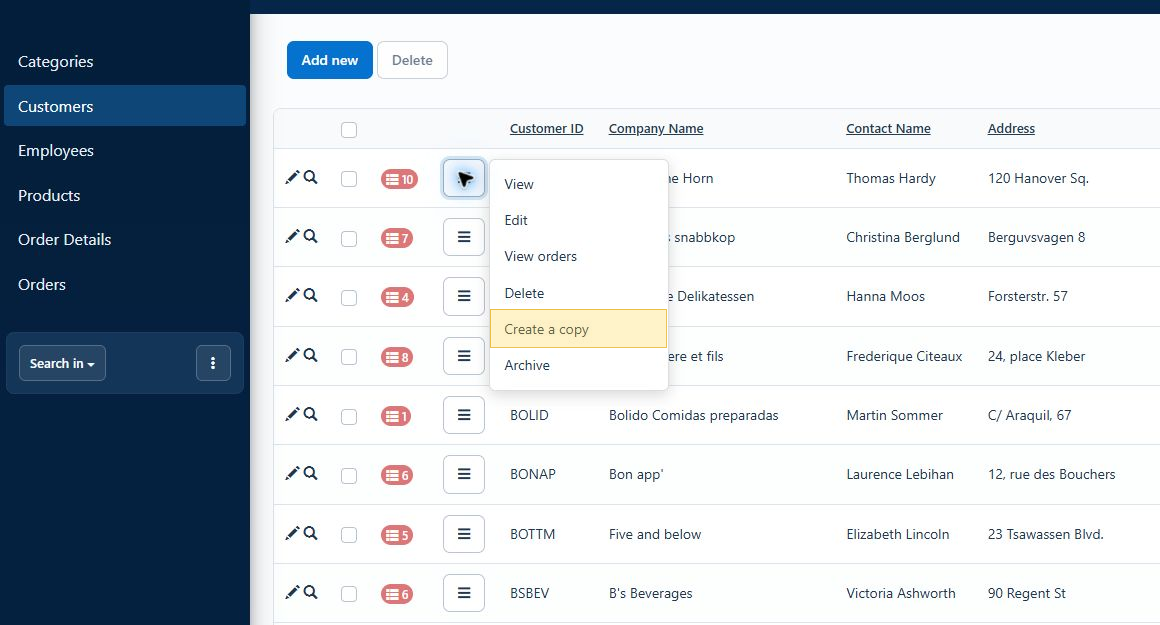
1. Adding the row actions button
Open the required List page in Page Designer and switch the grid to Advanced Grid mode. Select Insert – Custom button – New button, then place the button inside the grid so every record receives its own copy.
Clear the button label, select the bars icon, and set its Item ID to row_actions. The Item ID is important because the JavaScript uses it to find the button belonging to the current record.
This example uses the customers table, id as its key field, and CustomerID to open related orders. Replace those names where necessary. The table must have a key field selected on the Choose pages screen.
Keep the standard Edit button in the grid with the Item ID grid_edit. The menu will trigger that button, preserving the Edit behavior configured in Page Designer, including popup mode.
2. Building the menu in Client Before
Open the custom button code and add the following JavaScript to Client Before:
The button and the current record are identified through rowData.id and rowData.keys. If the menu would extend beyond the bottom or right side of the browser window, the positioning code moves it to the opposite side of the button.
The Copy action opens the Add page in Copy mode. This example has one key field, so it uses copyid1. Tables with composite keys also require copyid2, copyid3, and so on.
3. Processing Delete on the server
The Delete action is the only menu command that changes the database. Add the appropriate code to the custom button’s Server section.
The code verifies the current user’s Delete permission and obtains the record from the server-side button context. It does not trust a record ID supplied by the browser.
PHP
C#
Replace customers and id with the actual table and key field. If the database prevents deleting records that have related rows, either configure the required cascade behavior or replace Delete with the business rule appropriate for your application.
4. Refreshing the List page in Client After
Add the following JavaScript to Client After:
The grid reloads only after the server confirms that the record was deleted.
5. Styling the actions menu
Open Style Editor, click ‘Modify CSS’, and add the following code:
After rebuilding the project, open the Customers List page and test the menu on several rows. Confirm that View opens in a popup, Edit follows the configured Edit-button behavior, Copy opens a prefilled Add page, related orders open for the correct customer, and Delete refreshes the grid only after confirmation.
