Keyword search can miss records that describe the same problem using different words. In this tutorial, we will add semantic search to a PHPRunner support-ticket application. A search for ‘customers having access or login problems’ can find tickets about rejected credentials, unauthorized sessions, or account access even when they do not contain the exact search phrase.
The application uses the OpenAI Embeddings API to convert ticket text and each search phrase into vectors. PHPRunner then compares those vectors locally with cosine similarity and returns the 30 closest tickets. This approach is intended for relatively small collections. For tens of thousands of records or more, use a vector database instead of comparing every vector in PHP. The cosine similarity scores in the diagram measure how closely the vectors are related. They are not probabilities or percentages of correctness.
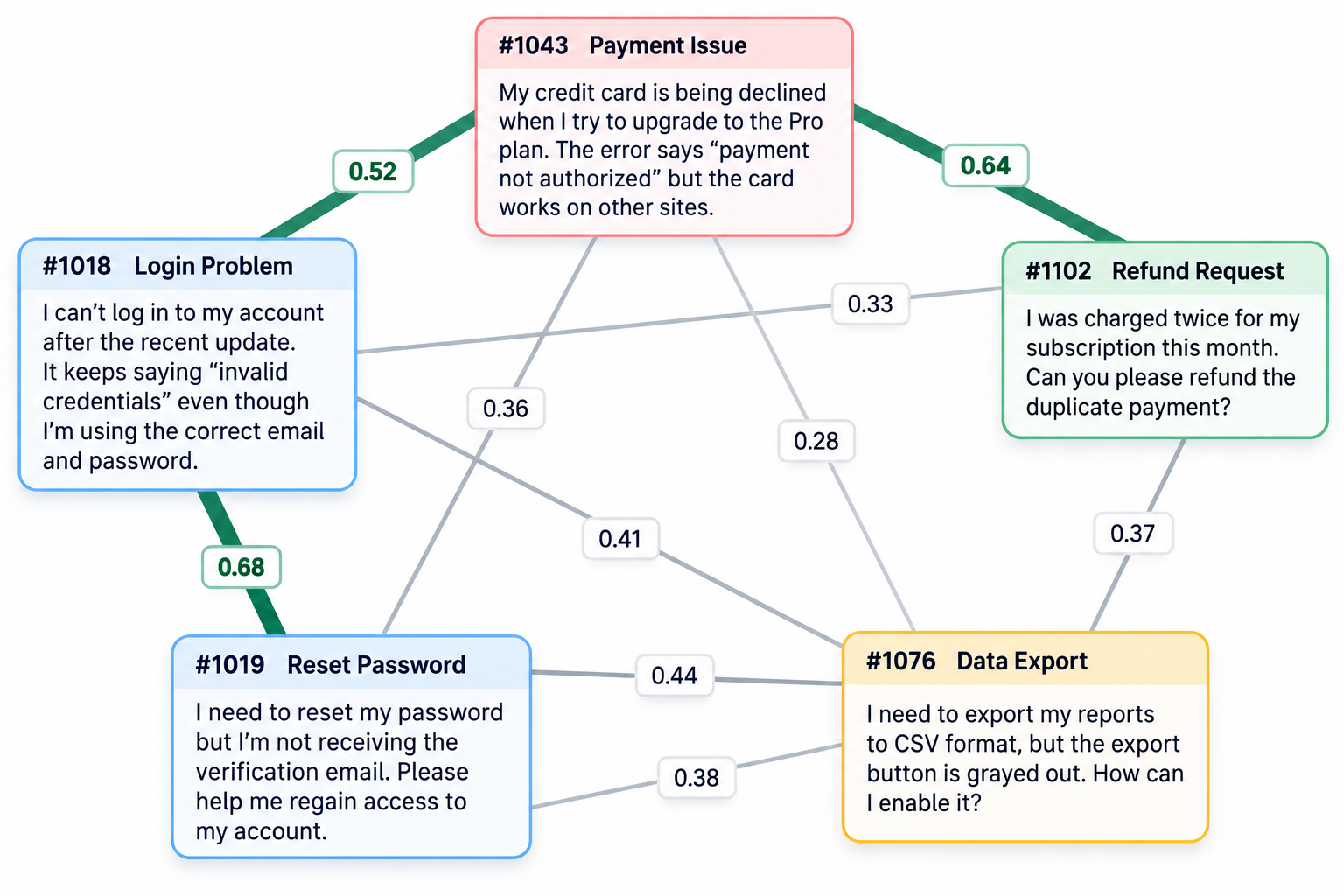
Semantic Search in Action
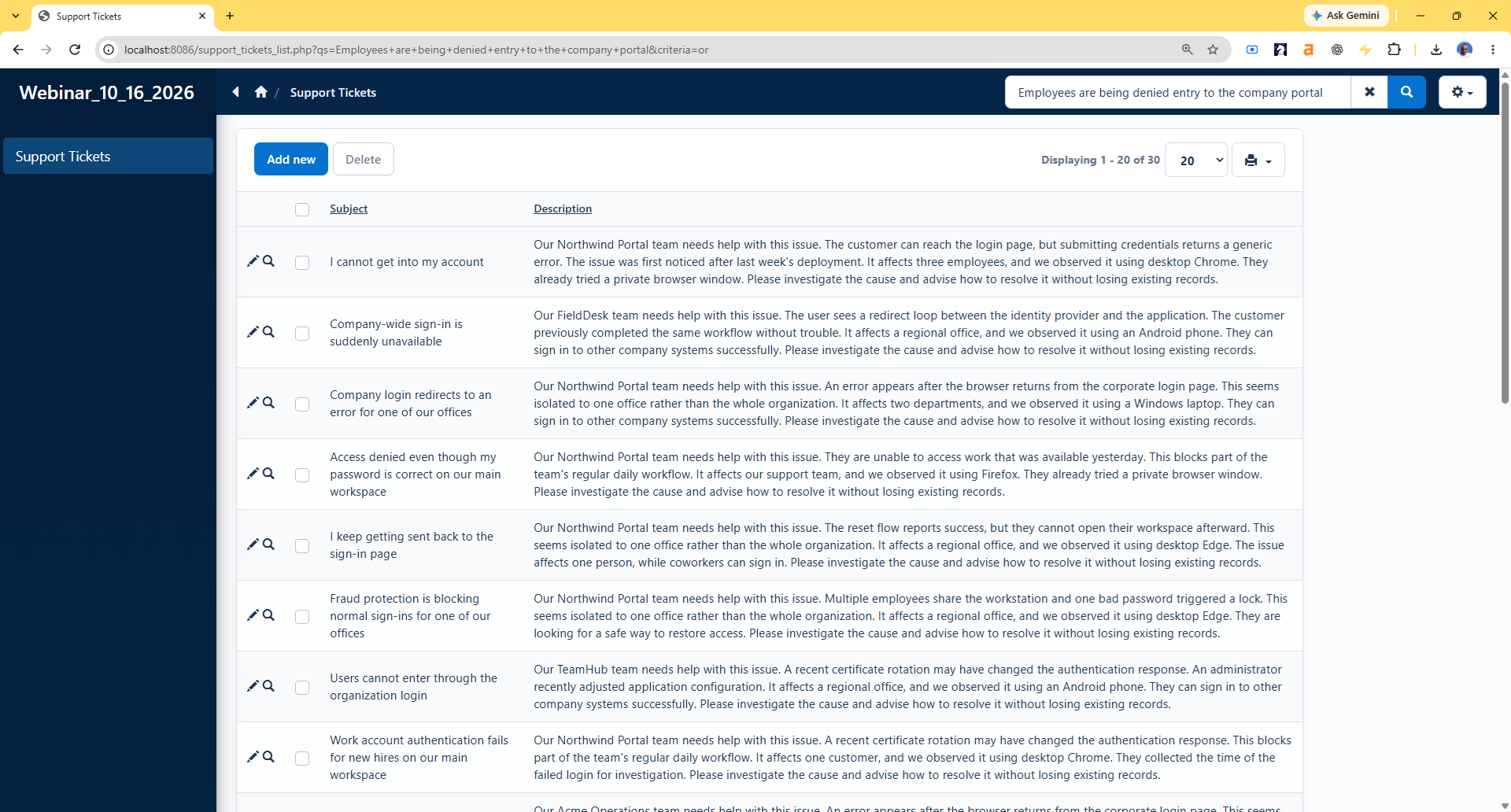
Let’s try searching for “Employees are being denied entry to the company portal.”
Notice that the results include tickets about failed logins, incorrect credentials, authentication errors, and users being redirected back to the sign-in page.
These tickets describe similar problems using different terminology. A traditional keyword search might miss some of them because the search phrase doesn’t contain words such as “password,” “login,” or “authentication.”
Semantic search recognizes the relationship between these descriptions and returns relevant tickets based on their meaning, not just matching words.
The application uses cosine similarity to rank the results, displaying the most relevant tickets first. Click the screenshot to see the exact search phrase and the results it returns.
How the search works:
- Each ticket’s subject and description are converted into an embedding vector.
- The vector is stored in the database with the ticket.
- The user’s search phrase is converted into a vector with the same embedding model.
- The generated PHP application calculates cosine similarity between the query vector and the stored ticket vectors.
- The most relevant tickets are returned in similarity order.
When a ticket is added or its searchable text changes, its subject and description are sent to the OpenAI Embeddings API. During a normal search, only the user’s search phrase is sent. Existing ticket vectors remain in the local database and are reused. OpenAI creates the vectors but does not search the ticket table; the similarity calculations happen locally in the generated PHP application.
1. Creating the support tickets table
Create the following MySQL table and add it to the PHPRunner project.
The optional sample SQL download creates this table and adds 500 support tickets with their precomputed embeddings.
support_tickets_500_with_embeddings
Open the table’s SQL Query screen and add a calculated field named semantic_query:
The calculated field gives PHPRunner a search condition that we can replace with the IDs returned by semantic search. Do not display semantic_query or the four embedding fields on the generated pages. On the List page, keep fields such as subject and description visible so readers can evaluate the results.
Turn off ‘Highlight search results’. Semantic matches often use different words, so ordinary keyword highlighting is not useful here.
2. Adding the embedding functions
Create an API key at platform.openai.com/api-keys. In the code below, replace YOUR_OPENAI_API_KEY with that key. The key is stored in a server-side session variable and is never sent to browser-side JavaScript.
Open Events – Global events – After App Init and add the following code:
The same text format must be used whenever a ticket embedding is created or checked. The hash lets the search code ignore an embedding if its subject or description no longer matches the stored vector.
The code contains a placeholder, not a real API key. Do not publish or distribute a populated key in project or generated application files. In production, keep the real key in server-side configuration outside the public application files, then assign that value to the session variable in After App Init.
Stored ticket vectors and search vectors must use the same embedding model and dimensions. Different models generally produce incompatible vector spaces. Preserve the original ticket text so the vectors can be regenerated if the model is replaced or discontinued. Regeneration uses the Embeddings API again and incurs API usage costs, although those costs are generally modest for small datasets.
3. Generating an embedding when a ticket is added
Open the support_tickets Add page – Before record added event and add this code:
The request is made on the server before the record is saved. The API key and returned vector are never sent to the browser. If the API request fails, the event returns false, so the ticket is not added with a missing or partial embedding.
4. Refreshing the embedding when a ticket is edited
Open the support_tickets Edit page – Before record updated event and add this code:
The API is called only when subject or description changes. Editing another field keeps the current embedding. If the API request fails, returning false prevents the update, so the previous ticket text and embedding remain unchanged.
5. Populating embeddings for existing records
New and edited tickets now receive embeddings automatically. If you imported the supplied sample SQL, its 500 records already include embeddings. Use the following utility only for other existing records that do not have embeddings yet.
Copy the supplied populate_embeddings.php file to the root of the generated PHPRunner application, next to support_tickets_list.php. Open the file in a browser and click ‘Start / Resume’. It processes 20 tickets per request, skips current embeddings, and continues until all records are ready.
The utility allows access only from localhost or by a PHPRunner administrator. Delete it from the generated application after the initial population is complete.
6. Replacing the basic search with semantic search
Open the support_tickets List page – Before process event and add the following code:
The code sends only the search phrase to OpenAI. The ticket database remains on your server. PHPRunner reads the stored vectors, calculates cosine similarity in PHP, and keeps the 30 highest-scoring ticket IDs. Repeating the same query within five minutes uses the session cache instead of creating another embedding.
7. Sorting tickets by similarity
The previous event filters the grid to the 30 matching IDs. MySQL still needs an explicit sort expression to display them in similarity order.
Open the support_tickets List page – Before SQL query event and add this code:
The MySQL FIELD() function follows the ID order produced by the similarity scores. The most relevant ticket appears first instead of the records being sorted by their numeric IDs.
8. Displaying semantic-search errors
Open the support_tickets List page – Before display event and add this code:
Rebuild the application, populate the existing embeddings, and enter a natural-language phrase in the List page’s basic search box. The grid should return the 30 tickets whose subject and description are closest in meaning, with the strongest match at the top.
