Inspection reporting
Build repeat inspection reports without overwriting the previous visit
Moving inspection reports off paper starts with a practical question: how much information must a technician enter again on the second visit? A useful system reuses the facility and equipment register without treating last month's observations as this month's results.
The important distinction is between what is being inspected and what happened on a particular visit. PHPRunner can provide the database-backed forms and reports around that model. The inspection rules, review process, and report contents still need to be designed for the work.
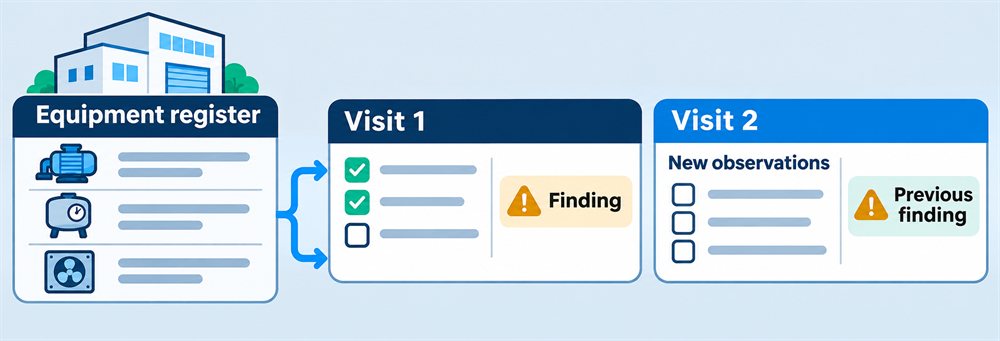
Quick answer: Reuse the facility and equipment register, but create new observations for every visit. Show previous findings as history, never as prefilled current results. Preserve the checklist version and an issued report snapshot so later edits cannot rewrite what an earlier inspection said.
Create the site once, create a new inspection every time
Use separate records for facilities, equipment, visits, and observations. A facility holds its stable identity and address. Equipment belongs to a facility and has a durable identifier, location, description, and active or retired state. A visit has its own date, assigned inspector, status, and checklist version. Observations belong to that visit and identify the equipment checked.
For a facility with 80 registered items, the next visit can begin with an 80-item worklist. It should not begin with 80 copied pass results. Mark every item as awaiting inspection until the technician records a new observation or an explicit reason it was not inspected.
If an item moves or is replaced, keep the old history attached to the original equipment identity. Preserve the identifying details needed to read an issued report as it was at the time, rather than letting a later register edit rewrite its meaning.
Make the first-site setup a reviewable import
Initial setup often takes longer than the inspection form itself. Start with a small representative site and define the minimum fields needed to identify each item reliably. Prefer a structured export or spreadsheet to manual retyping when one is available.
Import into a staging area first. Map columns, preserve source identifiers, check missing locations and duplicate equipment IDs, and let a person review the proposed register before accepting it. Repeating an import should not silently duplicate every item. If source material is a scanned report or PDF, extracted text is a proposal for review, not verified equipment data.
After the import, walk through a few items using the actual worklist. Can a technician distinguish two similar devices in the same room? Can a retired item be excluded from new visits without disappearing from an old report? Solve those problems before loading every site.
Freeze the checklist used for a visit
Give checklist definitions versions. A visit references the version assigned to it, and the completed report preserves the question text and response meaning needed to interpret the answers. Changing next month's checklist must not change last month's completed inspection.
Decide what happens to visits already in progress when a new version is released. Keep the original version or perform an explicit, reviewed migration. Do not silently add unanswered questions to a signed-off report or reinterpret an old answer under a new scoring rule.
Keep “not inspected,” “not applicable,” and a negative finding distinct. Require the relevant reason where your process calls for one. Missing data is not a pass.
Show previous findings without copying previous answers
Technicians benefit from seeing unresolved issues and the last visit's notes. Present that history alongside a new, empty observation form. Label it clearly as previous information rather than pre-filling today's result.
A finding should link back to the visit and observation that created it. Follow-up actions can record ownership, progress, evidence, and closure separately. A return visit verifies the current condition and can reference the original finding; it should not erase that finding to make the latest report look clean.
Photos and attachments belong to the visit or finding that gives them context. Preserve their original association and uploader information. An old photo reused for reference should not appear to be evidence captured today.
Treat recurrence as a plan, not a completed inspection
If scheduling already works elsewhere, begin with a manual “create next visit” action. Generate a fresh worklist from the current equipment register while preserving links to prior history. There is no need to rebuild billing, quoting, or a company calendar just to improve reporting.
If automatic recurrence is needed, distinguish a fixed calendar schedule from an interval measured after completion. “Every first Monday” and “one month after the previous visit closes” produce different dates. Give each scheduled occurrence a unique identity so a repeated scheduler run cannot create duplicate visits.
Keep missed visits visible and decide whether a new occurrence should still be created when the previous one remains open. A follow-up visit for one finding is not automatically the next full recurring inspection.
Issue a report that does not change behind the reader
Use explicit draft, submitted, reviewed, and issued states where they fit the team's process. Validate required observations and unresolved exceptions before issuing. Record who issued the report and when, and retain the version or snapshot delivered to the customer.
After issue, corrections should create an amendment or a new report version with a reason, not silently replace the original answers. A useful report identifies the site, equipment scope, inspection date, observations, exceptions, findings, and attached evidence. Keep omitted or inaccessible equipment visible instead of suggesting the full register was inspected.
Make export part of the pilot. Export the site and equipment register, visit records, observations, findings, and an attachment manifest with stable relationships. A printable report alone is not enough to migrate the underlying working history later.
Keep access and field conditions in the design
Enforce access to facilities, visits, reports, and attachments on the server. A customer should not reach another customer's file by changing a URL. Limit who can issue or amend reports, and retain an audit history of important changes.
Test forms on the devices technicians actually use. A responsive web form is not the same as offline support. If connectivity is unreliable, offline capture and conflict-aware synchronization need a separate design and test plan. Do not promise that a browser will safely queue photos and answers without implementing that behavior.
Location can be useful context, but it is not proof that an inspection occurred. If you collect it, allow for permission denial and inaccurate results. The location-awareness guide explains the difference between a stored site address and device coordinates.
Pilot two visits, not just the first form
- Import the same sample register twice and verify that no duplicate equipment appears.
- Complete a first visit with a finding, then create a second. Prior findings should be visible; current answers should be empty.
- Revise the checklist and rename or retire equipment. The first issued report must remain intelligible and unchanged.
- Try to issue a report with uninspected items. Confirm that the chosen validation and exception rules apply.
- Have two people edit the same observation. Detect stale changes rather than silently losing one person's work.
- Check attachment access using another customer's account, and export a complete small site's history.
This pilot tests the repeat workflow, not just whether a form can save a row.
Where PHPRunner fits
PHPRunner can supply forms, search, reports, authentication, permissions, and image or document handling around the inspection database. Configure those capabilities for the site's data model and add the server-side rules needed for report issue, revisions, and concurrent editing.
This is a custom facility and equipment reporting application, not a claim of certification or a substitute for specialist inspection software. Required checklists, qualifications, signatures, retention, and report acceptance must be established for the actual work. Start with one representative site and two visits before expanding the system.