Relational database design
Many-to-many relationships: the database pattern behind real business applications
Many business relationships go in both directions: an employee can work on several projects, and a project can have several employees.
Relational databases normally handle that situation by introducing a third table. The link table turns one many-to-many relationship into two one-to-many relationships; PHPRunner can then present that structure as familiar master-detail pages and lookups.
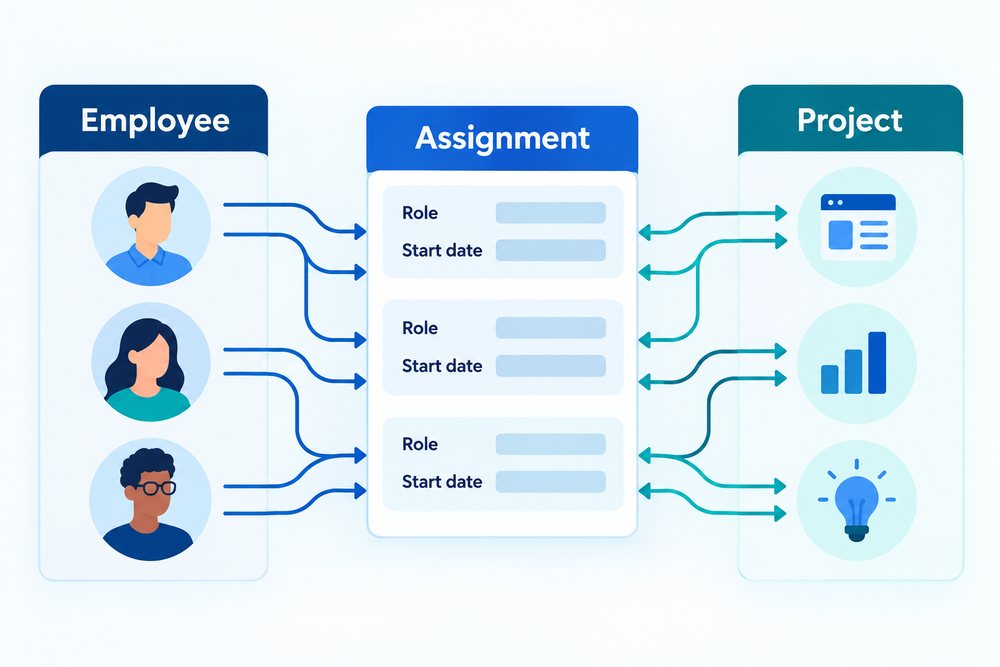
Employees
One row per employee.
Employee_Project
One row per assignment, containing EmployeeID and ProjectID.
Projects
One row per project.
Quick answer: Create a link table containing the keys of the two related entities. Each link-table row represents one relationship. Add a unique constraint on the key pair when the same relationship should not be stored twice.
Why two foreign-key columns are better than a list
Do not store ProjectIDs as comma-separated text inside an Employee row.
A text list makes it difficult to enforce valid project IDs, search efficiently, join to project data, or prevent duplicates. A link table keeps each relationship as a normal database row.
That means the database can index the IDs, enforce foreign keys, and answer questions in either direction: which projects does this employee have, and which employees belong to this project?
The link table can become a real business entity
Relationships often have properties of their own.
| Link-table field | Example meaning |
|---|---|
| EmployeeID | Which employee is assigned |
| ProjectID | Which project the assignment belongs to |
| AssignedDate | When the relationship started |
| Role | Project manager, developer, reviewer, etc. |
| AllocationPercent | How much of the employee's capacity is assigned |
| Active | Whether the assignment is current |
Common many-to-many patterns
Once you recognize the pattern, it appears everywhere.
- Users ↔ roles
- Products ↔ categories
- Students ↔ courses
- Employees ↔ projects
- Doctors ↔ facilities
- Documents ↔ tags
Where PHPRunner fits
The goal is to keep the architecture understandable while reducing repetitive application work.
PHPRunner can present link-table relationships through master-detail pages, lookups, inline operations, and custom queries so users work with names and business concepts rather than foreign-key IDs.
| Need | PHPRunner approach |
|---|---|
| Link table | Add the relationship table to the project just like any other table. |
| Master-detail navigation | Show related assignments directly from either side of the relationship. |
| Friendly lookups | Display employee, project, role, or category names instead of raw IDs. |
| Validation | Prevent duplicate links and enforce additional assignment rules through database constraints or application validation. |
Final recommendation
The third table is not a workaround; it is the normal relational representation of the relationship.
When two business objects can each have many of the other, create a link table and let the relationship become data.
This design is easier to query, validate, report on, and extend when the relationship later gains its own fields.