Booking workflows
Send booking reminders without duplicates or outdated details
Replacing a booking tool, a customer spreadsheet, and an automation service with one application does not remove the need for a notification process. It gives that process one authoritative booking record to work from.
A reminder is not simply an email sent when someone saves a form. It is scheduled work that must stay consistent with a changing appointment. A database application built with PHPRunner can hold the booking and staff workflow; a background job and messaging providers handle delivery.
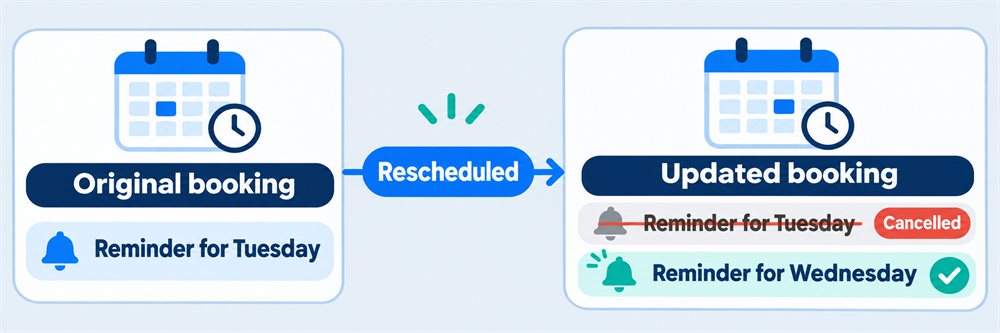
Quick answer: Treat every reminder as scheduled work tied to a specific booking revision. When an appointment is rescheduled or cancelled, invalidate its pending reminders before creating any replacement message. Give each intended notification a unique identity, then recheck the current booking immediately before sending.
Separate the booking from the messages it creates
Keep customers, appointments, staff-only notes, and notification jobs separate. An appointment contains the current start time, time zone, status, and customer. A notification job identifies the appointment, its relevant revision, the message purpose, channel, due time, and processing state.
Distinguish a booking confirmation, a timed reminder, a reschedule notice, and a cancellation notice. They have different triggers. Editing a private session note should not resend a confirmation or replace the reminder schedule.
For example, confirming a Tuesday 10:00 appointment creates a confirmation job and a reminder due Monday at 10:00. Changing an internal note leaves both alone. Moving the appointment to Wednesday invalidates Tuesday's pending reminder and creates a new one for the revised time.
Make schedule changes and pending work agree
When a booking changes, save its relevant revision and the corresponding notification work together in a database transaction. An alternative is a transactional outbox: save a durable event alongside the booking, then let a worker create jobs from that event. Do not rely on a successful page response as evidence that a message was queued.
Invalidate unsent jobs for an obsolete booking revision. A cancellation suppresses future appointment reminders, but may create its own cancellation notice. A reschedule can produce a change notice and a replacement timed reminder. Decide explicitly what happens if the replacement reminder's due time has already passed: send a near-term reminder, or skip it rather than silently sending every missed message.
Version the facts that affect the notification, not every database edit. Otherwise a spelling correction to a staff note could cancel useful queued work. Snapshot the message actually submitted for delivery so its history remains intelligible after the booking changes again.
Give each intended notification a stable identity
Use a unique job key such as appointment ID, relevant revision, message purpose, reminder slot, and channel. A database uniqueness constraint can prevent two requests from creating the same intended job. This is different from preventing two customers from reserving the same slot, which is covered in reservation conflict checking.
A scheduled worker must claim due jobs atomically so two simultaneous runs cannot both process the same row. Record the claim owner and a lease expiry so abandoned work can be recovered. Before a recovered job is retried, inspect the previous attempt and any provider reference rather than assuming that a missing success flag means no message was sent.
Use the provider's idempotency mechanism where available, preserving the same key for retries of the same send. Do not promise exactly-once delivery across a database and a remote messaging service. A timeout can occur after a provider accepted a message but before the application received its answer.
Recheck the booking immediately before sending
After claiming a job, check that the appointment is still eligible, the revision is current, the recipient and channel remain permitted, and the reminder is still useful. Mark obsolete jobs as superseded or skipped with a reason rather than deleting their history.
There is still a boundary: a cancellation can arrive while a provider request is already in flight. A submitted message cannot reliably be recalled. Keep that situation visible to staff, and send the appropriate change notice if the workflow requires it. Avoid wording that suggests a reminder guarantees the appointment has not changed.
Store scheduled instants consistently, retain the booking's named time zone, and display the appointment time with an unambiguous zone. Test daylight-saving changes. Decide whether “24 hours before” means 24 elapsed hours or the same local time on the previous day; those rules can differ.
Run delivery independently of the browser
Use a scheduled server process, such as cron or Windows Task Scheduler, to collect small batches of due work. Closing a browser must not stop tomorrow's reminders. Keep provider credentials on the server, outside browser code and message logs.
Record each attempt, including its timestamp, provider reference, response category, and sanitized error. Track queued, processing, accepted, delivered when confirmed, failed, skipped, and uncertain outcomes separately. “Accepted” is not proof that a customer read the message. Verify provider callback authenticity and handle repeated or out-of-order callbacks safely.
Retry transient failures with a delay, a maximum attempt count, and a cutoff after which a reminder is no longer useful. Permanent address errors and uncertain submissions need different handling. Give staff a filtered list of unresolved jobs instead of retrying forever. The background task guide covers restartable processing; the email delivery guide covers choosing a transport.
Respect channel preferences and minimize the message
Keep channel preferences and the basis for permission with the customer record. Apply opt-outs at send time as well as when creating jobs. Do not assume that supplying a phone number permits every type of SMS, or that a failed email authorizes switching to text. Confirm applicable provider and regional requirements before launch.
Use only the appointment details necessary for the reminder. Keep private session notes out of email and SMS. If a message links to booking details or cancellation controls, use access controls or a narrowly scoped, expiring link rather than exposing a guessable record ID.
Test the queue before enabling real delivery
- Confirm one booking, then save an unrelated staff note. Only the original confirmation and reminder should remain.
- Reschedule and cancel before the due time. Old reminders must be suppressed; intended status-change notices remain distinct.
- Run two workers together and replay a booking event. One intended job should be claimed once.
- Simulate a provider timeout after acceptance. The system should reconcile or flag uncertainty instead of blindly creating another send.
- Opt out after a job is queued. Delivery must respect the current preference.
- Test daylight-saving transitions, past-due jobs, expired claims, and duplicate delivery callbacks.
Start with a dry run that records intended recipients, timing, and redacted message content without contacting a provider. Then use an allowlisted set of test destinations. A dry run validates scheduling decisions, not provider delivery or production permissions.
Where PHPRunner fits
PHPRunner provides database-backed forms, search, permissions, and reporting. Use it for customer records, appointments, staff notes, and the notification status view. The worker, transaction boundaries, provider integrations, and retry rules described here are application-specific implementation work, not an automatic consequence of generating CRUD pages.
For video-meeting workflows, the Meetings template already includes email and SMS reminders. Evaluate its fit rather than assuming it implements every custom booking rule above. A useful first milestone is one booking type, one reminder interval, and one channel, with cancellation and retry tests passing before the second channel is added.