Security Assertion Markup Language (SAML) is an open standard that allows identity providers (IdP) to pass authorization credentials to service providers (SP). More info in Wikipedia.
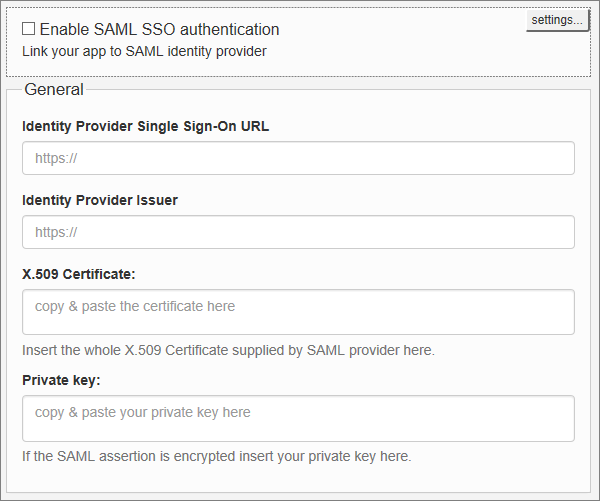
When you specify callback URL in SAML provider settings use samlcallback.php file name. For instance, if your project resides at https://website.com/myproject, the callback URL will be https://website.com/myproject/samlcallback.php.
Configure SAML authentication in Google Workspace
Create the application in Google Workspace
In the Google Admin console:
1.Open Apps > Web and mobile apps.
2.Click Add app > Add custom SAML app.
3.Enter an application name, for example, PHPRunner integration.
Copy the identity provider settings displayed by Google to the corresponding fields in PHPRunner:
Google setting |
PHPRunner setting |
SSO URL |
Identity Provider Single Sign-On URL |
Entity ID |
Identity Provider Issuer |
Certificate |
X.509 Certificate |
Important: Copy the complete certificate, including the following beginning and ending lines:
-----BEGIN CERTIFICATE-----
...
-----END CERTIFICATE-----
Configure service provider details in Google
On Google's Service provider details page, enter the following values. Replace the example server and project path with the URL of your application.
ACS URL |
https://your-server/your-project/samlcallback.php |
Entity ID |
https://your-server/your-project/ |
Important: Google cannot use http://localhost for this configuration. Deploy the application to a website that is accessible through HTTPS.
Configure attribute mappings
On Google's Attribute mapping page, map Basic Information > Primary email to the app attribute email.
Then, under SAML attributes in PHPRunner, enter email for both Display name and Email.
You can map additional attributes and use them in the application. Each value is available under the name entered in Google's App attributes field.
Enable user access
In Google Admin, open User access for the application and change it from OFF for everyone to ON for everyone, or enable it only for the organizational units or groups that should use the application.
Use mapped attributes in the application
All mapped attributes are available through the Security API: rawUserData() function.
For example, to display the user's full name instead of the email address, add these mappings on Google's Attribute mapping page:
•Basic Information > First name - firstname
•Basic Information > Last name - lastname
Add the following code to the After successful login event.
$claims = Security::rawUserData();
Security::setDisplayName( htmlspecialchars( $claims['firstname'] . ' ' . $claims['lastname'] ) );
Security screen articles:
•CAPTCHA on authentication pages
See also: