What are the Predefined actions?
Action in the ASPRunnerPro is a piece of code that you can assign to Events. Actions determine what exactly occurs within the Event.
The ASPRunnerPro comes with the set of the Predefined actions - pre-made code samples which you can customize.
Note: You can write your code and combine it with the pre-made samples.
Add, edit, and modify Predefined actions on the Events screen.
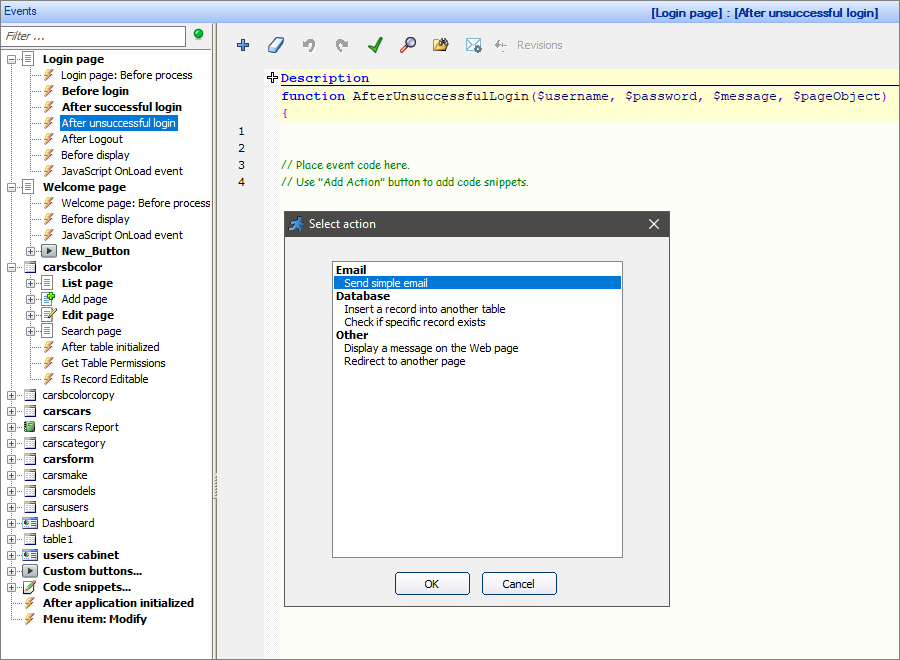
Note: You cannot use Predefined actions with JavaScript onload events.
A list of the Predefined actions
Predefined actions are divided into three groups:
1.Email - these actions allow sending various emails in different conditions;
2.Database - these actions allow different operations in the Database;
•Save new data in another table
•Save old data in another table
•Insert a record into another table
•Check if specific record exists
3.Other:
•Display a message on the Web page
Note: Each of the predefined actions works with specific events only. To learn more, see the respective articles.
See also: