Contents

Introduction
Welcome
System requirements
Licensing details
What is the registration
Quick start guide
Using PHPRunner
Working with projects
Navigation bar
Templates
What are templates
Cars
Classified ads
Events
Jobs
Knowledge base
News
Paypal
Real estate
Sporting
Vacation houses
Connecting to the database
Datasource tables
Master-detail relationship between tables
SQL query page
About SQL query designer
Query Designer
SQL
Results
Charts
Creating chart
Chart parameters
Chart appearance
Using SQL to shape chart data
Reports
Creating report and setting parameters
Report totals and layout
Choose pages
Choose fields
Fields order and totals
Miscellaneous settings
Security
Login page
User login settings
Advanced security settings
User group permissions
Dynamic Permissions
Choose theme
Visual Editor
About
Toolbars
Page Elements
Adding PHP code snippet
"View as" settings
"View as" settings: Custom
"Edit as" settings
Validation types
Lookup wizard
Menu builder
Events
Output directory settings
After you are done
FTP upload
FrontPage Publishing
Advanced topics
Events
Predefined actions
Send a simple email
Send an email with new data
Send an email with old data
Save new data in another table
Save old data in another table
Insert a record into another table
Check if a specific record exists
Display a message on the Web page
Redirect to another page
Sample events
Appearance
Add dropdown list box with values for search
Add foldable section
Change cell background color
Change row background color
Disable record editing
Hide controls on Add/Edit pages, based on logged user name
Redirect to details page after master record was added
Show data from master table on detail view/edit/add page
Show pop-up window
Make search button return data only when search value was entered
Database
Before deleting a record check for related records
Select multiple values from checkboxes or a list field and have them appear as individual database entries
Show list of customer orders
Update multiple records on the List page
Update multiple tables
Dynamic SQL query
Record locking
Email
Email selected records
Send an email with updated fields only
Send mass email to all users
Upload
Check size and extension of uploaded files
Rename uploaded files
Upload files to users folders
Misc
Check if start date is ealier than end date
Speed up data entry using events
Save user data in session variables
Implementing 'single sign on' feature
Redirect to user info edit page
Global events
Login page
Before process
Before login
After successful login
After unsuccessful login
Before display
Menu page
Before process
Before display
Register page
Before process
Before registration
After successful registration
After unsuccessful registration
Before display
Change password page
Before process
Before change password
After password changed
Before display
Remind password page
Before process
Before password reminder sent
After password reminder sent
Before display
After application initialized
Table events
Add page
Before process
Before record added
After record added
Before display
Copy page
OnLoad
Edit page
Before process
Before record updated
After record updated
Before SQL query
Before display
List page
Before process
Before record deleted
After record deleted
After group of records deleted
Before SQL query
Before record processed
After record processed
Before display
Printer-friendly page
Before process
Before SQL query
Before record processed
After record processed
Before display
View page
Before process
Before SQL query
Before display
Search page
Before process
Before display
Export page
Before process
Before SQL query
After table initialized
Page life cycle overview
Programming topics
Data Access Layer
Debugging tips
How to control Inline Add/Edit functionality from script
Master-details relationships
PHPRunner session variables
PHPRunner templates
runner_mail function
Template files processing rules (Files.txt)
Template language
Using JOIN SQL queries
Useful links
Publishing PHP application to the remote Web server
Using FTP client to publish PHP pages to the remote Web server
Using FrontPage to publish PHP pages to the remote Web server
Demo Account
What is the Demo Account?
Terms and Conditions
Enterprise Edition
Online report/chart builder
Online report/chart builder v2.0 - Installation notes
Creating web report
Creating web chart
Domain host instructions
Yahoo!
Connecting to MySQL
Configuring FTP
Publishing project via FTP
1&1
Connecting to MySQL
Configuring FTP
Publishing project via FTP
GoDaddy.com
Connecting to MySQL
Configuring FTP
Publishing project via FTP
WebHost4Life.com
Connecting to MySQL
Configuring FTP
Publishing project via FTP
MyHosting.com
Connecting to MySQL
Configuring FTP
Publishing project via FTP
InspiRunner.com
Connecting to MySQL
Configuring FTP
Publishing project via FTP
How to install local web server (XAMPP)
Connect using PHP
AJAX-based Functionality
Multilanguage support
Stylesheets
Rich Text Editor plugins
PDF view settings
Order PHPRunner online

 
Home
PHPRunner 5.1 manual
Prev Page Next Page


User group permissions


This feature allows to assign table level permissions on database tables and views. I.e. user A can add data into table1 and edit data in table2, user B can edit and search data in table1 and can delete data in table2 etc.

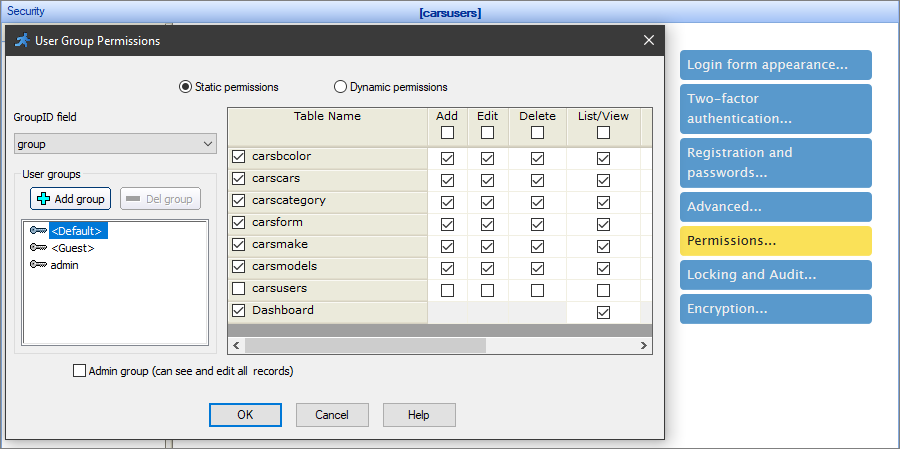
To use this feature proceed to the Security page in PHPRunner, click on the Permissions button.

There are two ways to define user group permissions:

  • in the PHPRunner directly before building project (Static permissions option). In this case if you want to change some security settings you'll need to open PHPRunner project, make some changes on the User Group Permissions dialog and rebuild project.

  • on the generated pages (Dynamic permissions option). PHPRunner create new tables for user group permissions settings in the database and build admin area in the application. Admins can update permissions online.

Static permissions

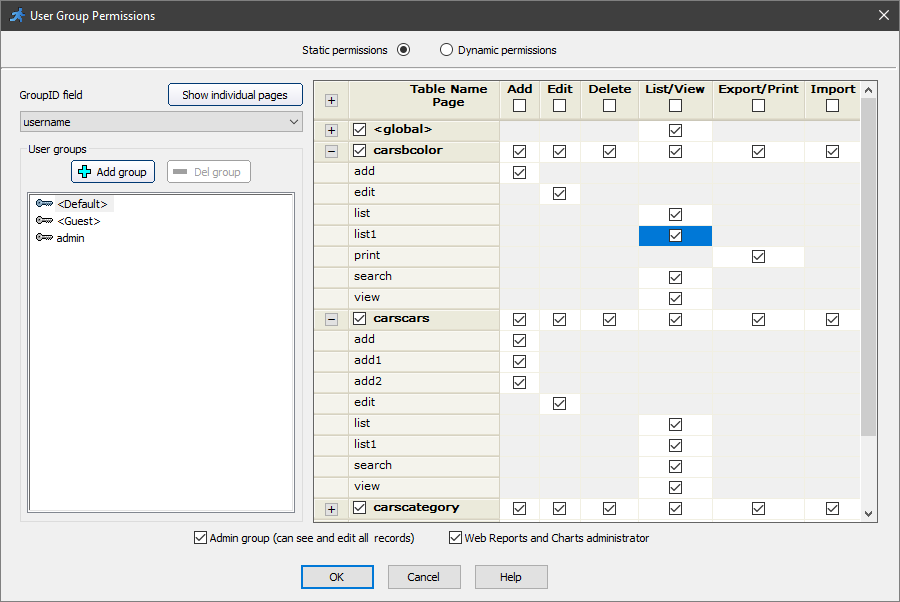
On this screen, you can create user groups with assigned set of permissions.

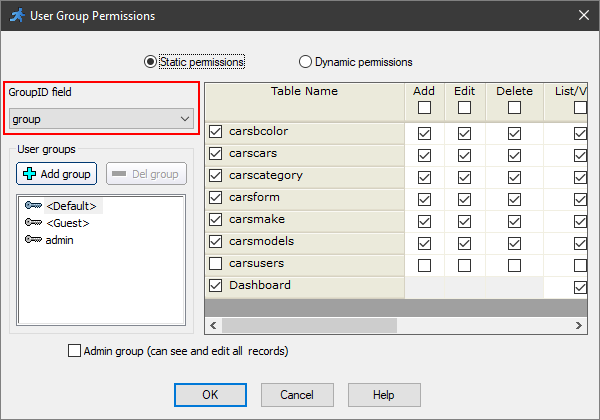
First of all choose GroupID field that stores group name or id (see screenshot).

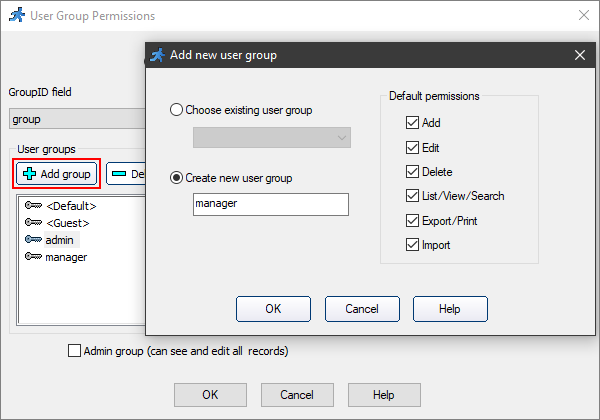
To add a new group, click Add group button. A dialog box will appear where you can choose username which defines this group and define initial set of permissions. Afterwards, you can change permissions for certain tables.

You can create a user group based on non-existing GroupID field value (if you plan to add users to this group later).

Apart from this, you can create a default group with a default set of permissions. When a user that does not belong to any of specified groups is logged in, the default set of permissions mentioned above is assigned to him. For example, as shown on the screenshot above, the user not belonging to any of the groups, is able to edit and delete data, but is not able to add or search records in any table.

To delete selected group, click Del group button.

To overwrite existing group, click Add group button and choose the same group id value.

You can set any group to be an admin group. This option is availble to you when one of Advanced Security options are in use.


Converted from CHM to HTML with chm2web Standard 2.83 (unicode)