Quick jump |
The SQL tab allows you to modify the SQL queries manually. The changes in this tab automatically appear in the Query Designer tab.
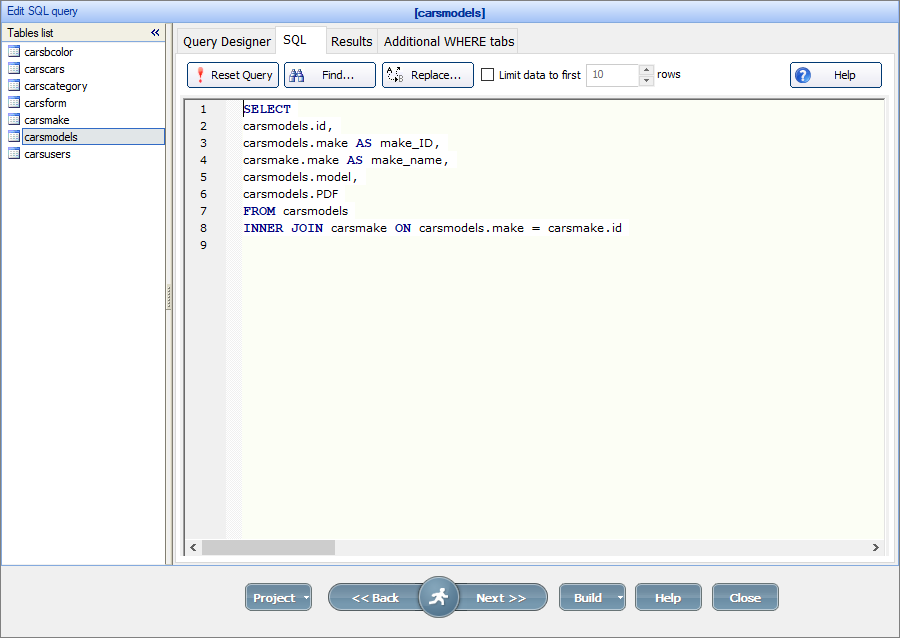
To switch between the tables, use the Tables list panel on the left.
This feature allows you to limit the number of records to be displayed on the List, Print, Export, Details pages. It can be useful if you need to speed up the loading of the webpage; or when your chart has too many items in it, and you need to show only the most significant ones. It also works with the List pages added to the Dashboard.
The search and filters are applied first, and then the results are limited to first "N" rows.
This option works with all PHPRunner project items except with the reports that have group fields selected.
When you connect to databases like DB2, Oracle or PostgreSQL, and your SQL query contains aliases, we recommend to enclose them in double-quotes. Here is an example:
select FieldName as "FieldAlias"
from TableName
If the field was assigned an alias in the SQL query, then the values array gets the alias instead of the field name from the database. E.g., if you have an SQL query SELECT salesrep_id AS Inv_Salesrep ..., you should use values("Inv_Salesrep").
Note: we do not recommend using aliases to give a field another name. If you have long or complicated field names, you can assign a label to the field on the Choose fields page or in the Label editor instead of using aliases.
Note: to learn more about join types, see Using JOIN SQL queries.
SQL query:
SELECT
carsmodels.id,
carsmodels.model,
carsmodels.make
FROM carsmodels
INNER JOIN carsmake ON carsmodels.make = carsmake.id
Note: it's recommended to use aliases for fields from joined tables to avoid confusion when two fields from different tables have the same name.
SQL query:
SELECT
category,
color,
Date Listed,
descr,
EPACity,
EPAHighway,
features,
UserID,
YearOfMake,
zipcode,
Price*0.1 AS Discount
FROM carscars
In the example above, the alias Discount is assigned to the calculated field Price*0.1.
Note: if the field was assigned an alias in the SQL query, then the values array gets the alias instead of the field name from the database. So you should use values["Discount"] instead of values["Price*0.1"] in your events.
For more information about events, see Events.
SQL query:
SELECT *
FROM carscars
WHERE YearOfMake =2004
For more complicated queries, wrap the condition with parentheses:
SELECT *
FROM carscars
WHERE ( YearOfMake =2004 OR YearOfMake =2005 )
SQL query:
SELECT
Make,
Model,
AVG (YearOfMake)
FROM carscars
GROUP BY Make, Model
ORDER BY Make
•Unions;
•DISTINCT keyword.
If you need to use these keywords, there are two options. First is to use SQL Views. The other one is to create a view in your database using CREATE VIEW command, then use that view as a data source in PHPRunner. Check your database manual for syntax.
In MS Access views are called queries and can be created this way:
1. Run MS Access and create a new query. Switch to SQL view.
2. Insert your SQL query there.
3. Save this query as qryNewQuery.
4. Run PHPRunner and use qryNewQuery as a datasource table.
For all other SQL query types, for instance:
•Stored procedure calls;
•Update/Delete/Insert/Create queries;
•queries with non-standard SQL language elements such as MySQL variables
we recommend using SQL Views.
See also:
